
You have probably seen this happen before. You click the buy button on a fast-moving stock, but the price you actually get is much higher than what you saw on your screen. We are going to walk you through exactly why that happens and how to take full control of your entries and exits. By the end of this guide, you will know exactly which order type to use for any trading scenario, backed by real numbers and specific examples.
What Are the Main Stock Order Types Every Trader Should Know?
Bottom Line: Knowing which order type to use is not a minor detail. It directly determines the price you pay, the risk you take on, and whether your exit strategy executes as planned. Master the mechanics of market, limit, stop-limit, and OCO orders first, and you free up mental bandwidth to focus on finding quality setups rather than fixing execution mistakes.
When our team teaches platform mechanics, we always start with the foundation. The four primary tools in your trading platform dictate how and when your trades execute:
- Market orders prioritize execution speed over the final price.
- Limit orders prioritize your specific price over execution speed.
- Stop-limit orders combine a trigger price with a strict limit price boundary.
- OCO orders allow you to set two conditional orders simultaneously.
Understanding these mechanics is essential for protecting your trading capital. You cannot build a profitable strategy if you do not know how to enter and exit the market safely.
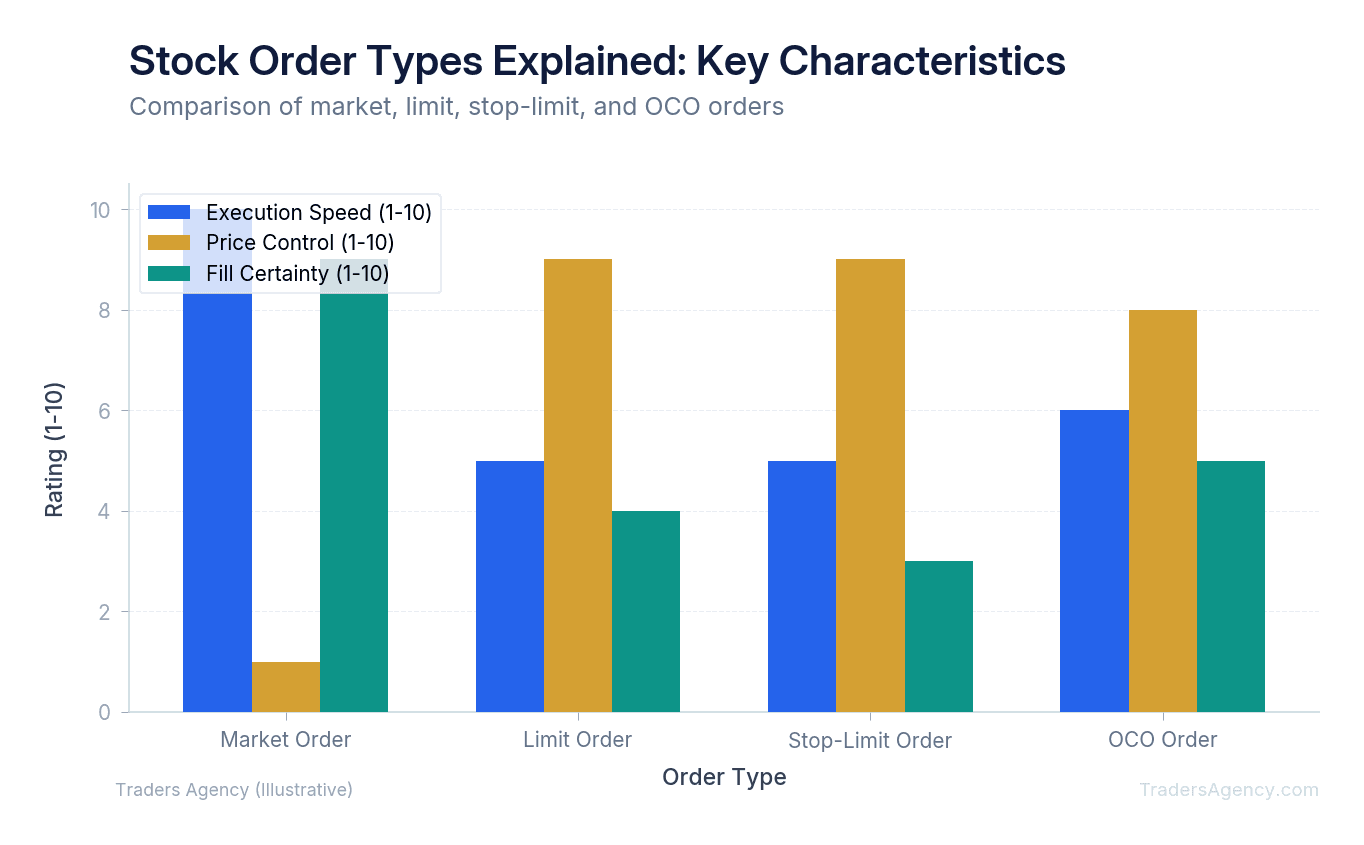
| Order Type | Execution Speed | Price Control | Fill Certainty |
|---|---|---|---|
| Market | Fastest | None | Highest |
| Limit | Varies | Full control | Not guaranteed |
| Stop-Limit | Varies | Full control after trigger | Not guaranteed |
| OCO | Varies | Full control on both legs | One leg cancels when the other fills |
What Is a Market Order and When Should You Use It?
A market order is an instruction to buy or sell a stock immediately at the best available current price. This order type prioritizes execution but does not guarantee the final price. You should use a market order only when speed is your top priority and exact pricing matters less.
We teach our members to use market orders sparingly. If you are buying shares of Apple (AAPL) during normal trading hours, a market order will likely fill within pennies of the quoted price. Highly liquid stocks handle market orders very well.
However, if you trade a low-volume penny stock, the lack of liquidity can cause severe problems. The biggest risk with market orders is slippage. Slippage occurs when the price changes rapidly between the moment you submit the trade and the moment the exchange processes it.
Key Concept: Slippage is the difference between the price you expected and the price you actually received. If a stock is trading at $50.00 and suddenly spikes, your market order might execute at $51.50. You just lost money before the trade even started.
We prefer to avoid market orders during the first five minutes of the trading day when volatility is at its highest. That opening bell chaos is where most slippage-related losses occur.
How Does a Limit Order Work?
A limit order is an instruction to buy or sell a stock at a specific price or better. This order guarantees your price but does not guarantee execution. If the stock never reaches your specified limit price, your broker will simply leave the order unfilled.
The SEC's investor education resources frequently highlight limit orders as a primary way to protect yourself from unexpected price spikes. We use limit orders for almost all of our standard entries, and we recommend you do the same.
Here is a concrete example. Imagine Tesla (TSLA) is currently trading at $205.00. You want to buy 100 shares, but you refuse to pay more than $200.00. You place a buy limit order at $200.00.
| Scenario | What Happens | Result |
|---|---|---|
| Price drops to $200.00 | Order executes at your limit price | You own 100 shares at $200.00 |
| Price drops to $199.00 | Order executes at the better price | You own 100 shares at $199.00 |
| Price rallies to $210.00 | Order never fills | You buy nothing |
The main drawback is the risk of a partial fill. If only 50 shares are available at your limit price, your broker might only fill half your order. This is especially common with smaller, less liquid stocks.
Stop Orders vs. Stop-Limit Orders: What Is the Difference?
A stop order becomes a standard market order once a stock hits your trigger price. A stop-limit order becomes a strict limit order once triggered. The key difference: a stop order prioritizes getting you out of the trade by converting to a market order, while a stop-limit order sets a price floor (or ceiling) that the execution cannot cross, at the risk of not filling at all.
Many beginners confuse these two tools. A standard stop-loss is designed to get you out of a bad trade as quickly as possible. If you buy a stock at $100.00 and set a stop order at $90.00, your broker will convert it to a market order once the stock trades at or through $90.00, and it will fill at the next available price.
But what happens during a gap down? This is where we see traders make painful mistakes.
Suppose you hold a stock at $100.00 with a stop-limit order. Your trigger is $90.00, and your limit is $89.00. Overnight, the company reports terrible earnings. The next morning, the stock opens at $80.00.
Watch Out: Because the price gapped below your $89.00 limit, your stop-limit order will trigger but will not execute. You are now stuck holding a crashing stock at $80.00 because you demanded a price of $89.00 or better. In gap scenarios, a standard stop order would have sold your shares at approximately $80.00. It hurts to take a larger loss, but it gets you out of the burning building.
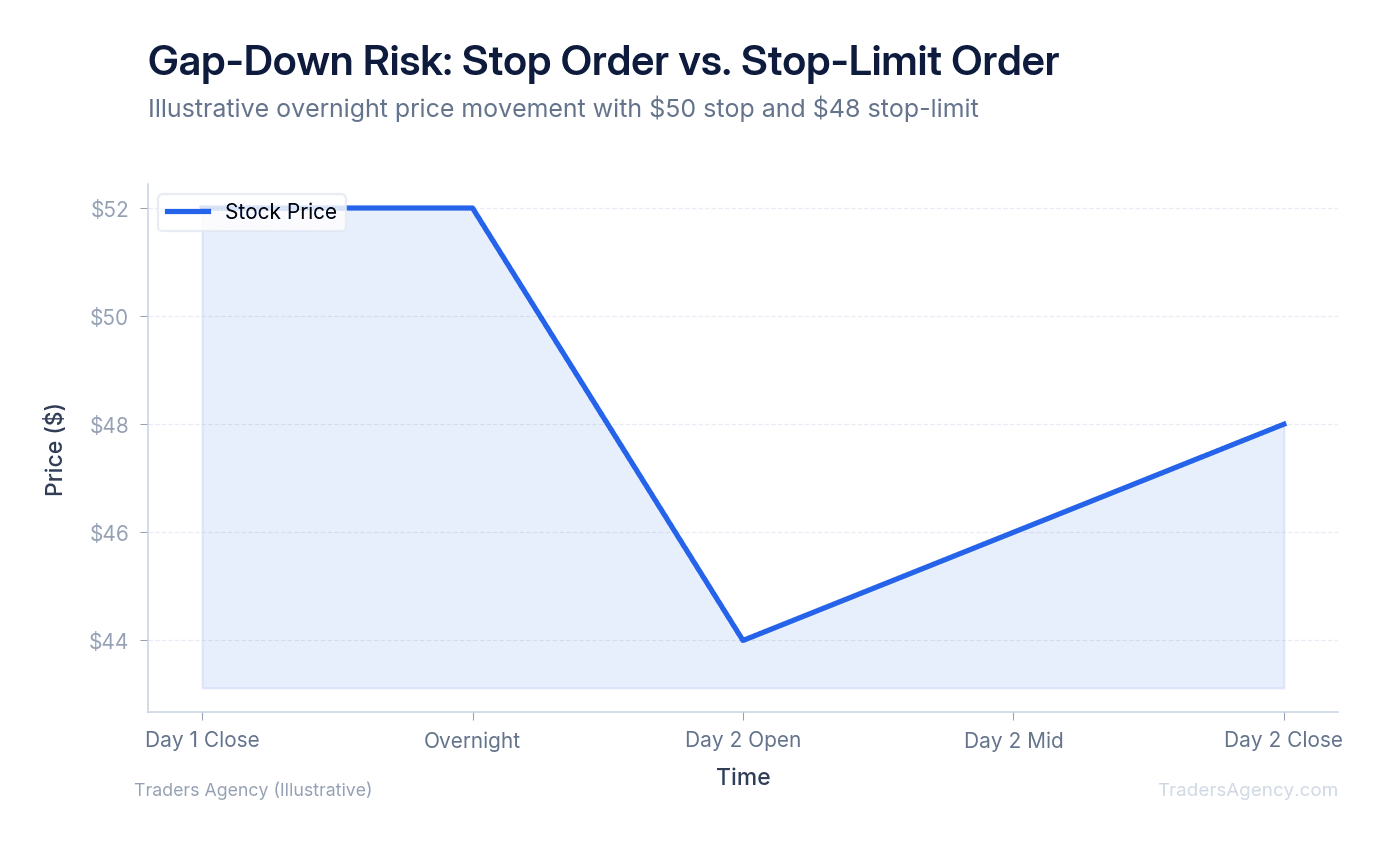
| Parameter | Stop Order | Stop-Limit Order |
|---|---|---|
| Trigger Price | $90.00 | $90.00 |
| Becomes | Market order | Limit order at $89.00 |
| Gap-down to $80.00 | Fills at approximately $80.00 | Does not fill |
| Execution Guarantee | High (but not absolute) | No |
Time-in-Force Options: GTC, DAY, and IOC Explained
Time-in-force settings tell your broker exactly how long an order should remain active before being canceled. These settings give you total control over the lifespan of your pending trades. Every time you place a limit or stop order, you must choose one of these options:
- DAY (Day Order): The order automatically cancels at the end of the regular trading session at 4:00 PM Eastern if it does not fill.
- GTC (Good-'Til-Canceled): The order remains active for an extended period, typically up to 90 days, depending on your broker.
- IOC (Immediate-Or-Cancel): The broker attempts to fill as many shares as possible instantly, and any unfilled portion is immediately canceled.
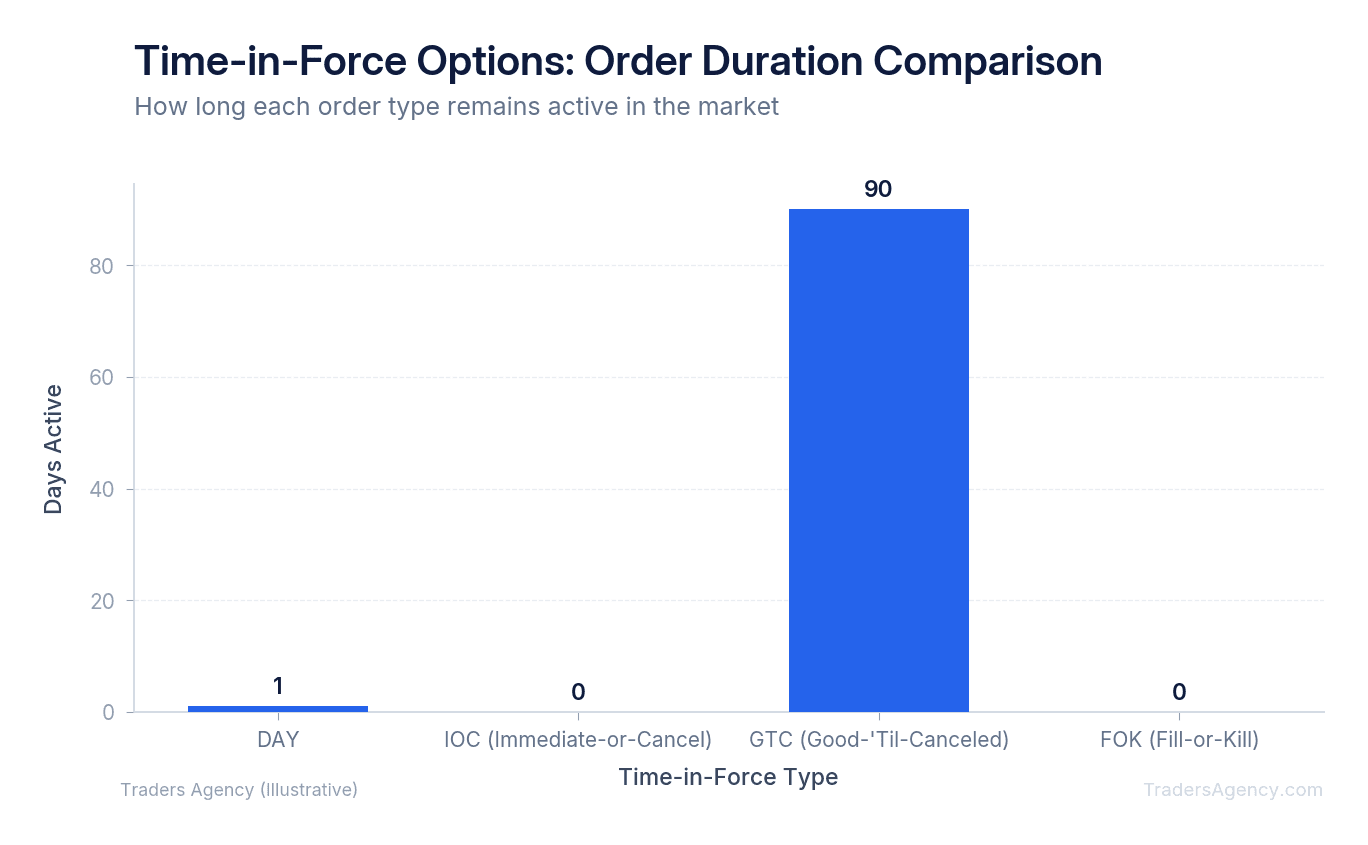
We use GTC settings for our long-term profit targets. If you forget to check your time-in-force setting, you might accidentally leave a buy order open for weeks. We always verify this setting before clicking submit.
Want expert trading insights delivered daily?
Join thousands of traders who rely on Traders Agency for market analysis and trade ideas.
Join Traders AgencyWhat Is an OCO Order and How Does It Protect Your Trade?
An OCO order stands for One-Cancels-the-Other. It allows you to place two linked orders at the same time. When one of the orders executes, the trading platform automatically cancels the second order. This is the perfect tool for setting both a profit target and a stop-loss simultaneously.
Our team highly recommends mastering OCO orders. They remove the emotion from your exits and automate your trade management. You do not need to sit and stare at your screen all day.
Here is a step-by-step example of an OCO order in action:
- Enter your position: You buy 100 shares of a stock at $50.00.
- Set your profit target: Place a sell limit order at $55.00 as the first leg of your OCO.
- Set your risk protection: Place a sell stop order at $45.00 as the second leg of your OCO.
- Let the system work: If the stock rallies to $55.00, your limit order fills and you secure a $500 profit. The platform instantly cancels the $45.00 stop order. You are completely flat and safe.
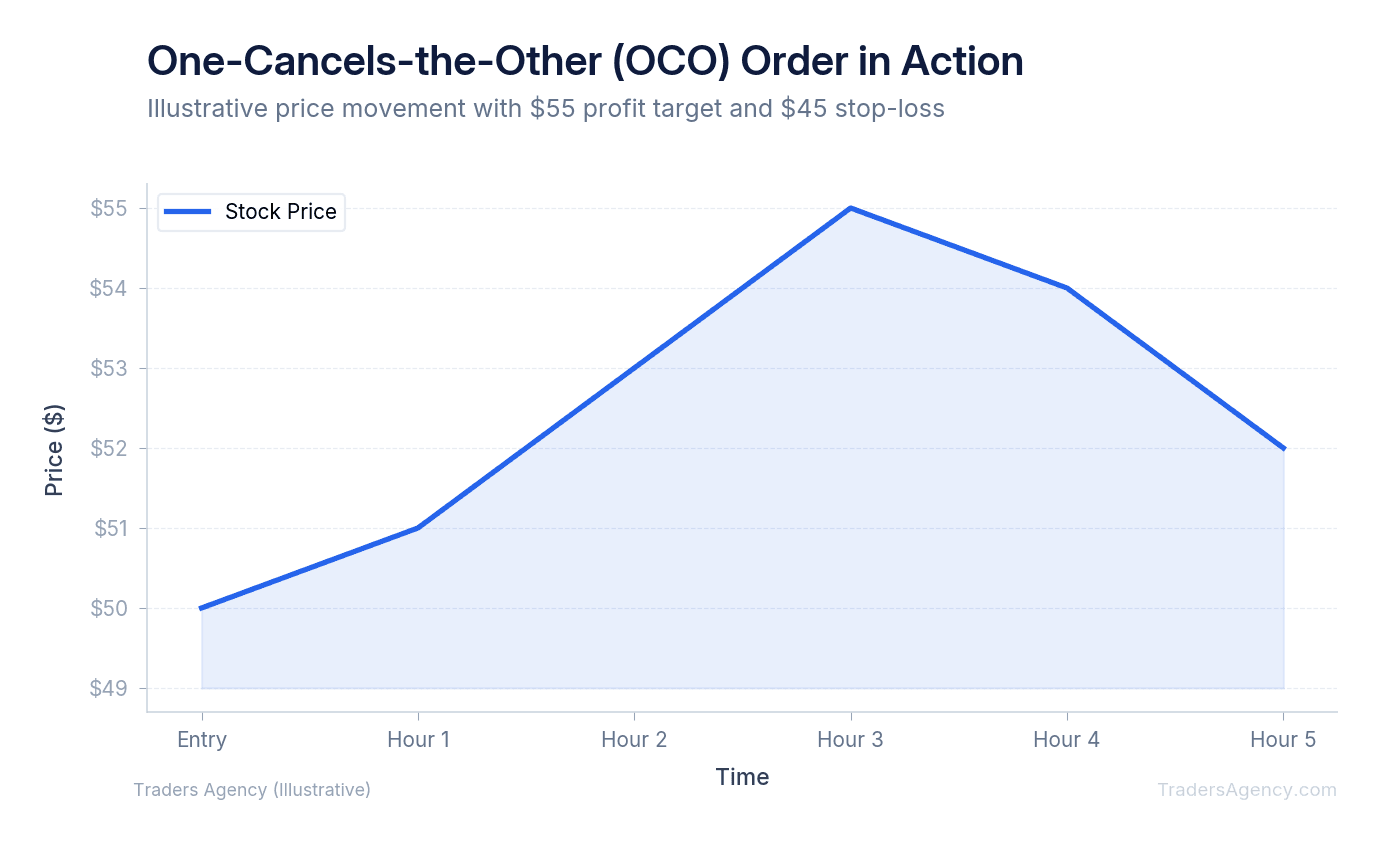
If you tried to place these two orders separately without the OCO function, you could end up accidentally shorting the stock if both orders eventually filled.
What Is the 3-5-7 Rule in Trading?
The 3-5-7 rule is a risk management framework that helps traders scale out of positions. It involves taking partial profits at a 3 percent gain, securing more profit at a 5 percent gain, and leaving the final portion to run for a 7 percent gain.
Getting your order types down is the mechanical foundation, but rules like this help you apply those tools effectively. We teach our members to use limit orders to execute these specific profit targets automatically.
| Profit Target | Entry at $100.00 | Sell Limit Price | Action |
|---|---|---|---|
| 3% gain | First batch of shares | $103.00 | Lock in initial profit |
| 5% gain | Second batch of shares | $105.00 | Secure additional gains |
| 7% gain | Final batch of shares | $107.00 | Let the winner run |
This strategy locks in gains systematically while protecting your downside. You can even use OCO orders for each batch of shares to ensure you have stop-loss protection on the entire position.
What Mistakes Do Beginners Make With Stock Order Types?
The most frequent mistake beginners make is using market orders during periods of high volatility. We see new traders lose money simply because they pressed the wrong button. Order execution requires precision.
Watch Out: If a stock is trading at $50.00 and you place a buy limit order at $55.00, your broker will fill the order immediately at $50.00. A limit order means you want that price or better. Since $50.00 is better than $55.00 for a buyer, the system executes the trade instantly. If you wanted to wait until the stock broke out above $55.00, you should have used a buy stop order instead.
Here are the errors we see most often:
- Using market orders during volatile opens: The first five minutes of the trading day are the worst time to submit a market order.
- Setting a buy limit above the current price: This triggers an immediate fill, which defeats the purpose of a limit order.
- Forgetting to cancel old GTC orders: An order you placed weeks ago can suddenly fill when the stock revisits that price level.
- Holding tight stop-losses through earnings: We never recommend this. The market frequently experiences massive price gaps outside of regular trading hours, rendering standard stops highly unpredictable.
How Do You Place a Market, Limit, Stop-Limit, or OCO Order?
Placing a trade requires selecting the correct parameters in your broker's order ticket. You must choose the action, the quantity, the order type, and the time-in-force. Verifying these details before submission prevents costly execution errors and ensures your strategy plays out as intended.
Here is what we teach our members about the physical execution process. Follow these exact steps when you open your brokerage platform:
Step 1: Define Your Trade Parameters
Before you open the order ticket, you need a plan. Know your exact entry price, your profit target, and your maximum acceptable loss. We prefer to write these numbers down so we do not make emotional decisions in the heat of the moment.
Step 2: Fill Out the Order Ticket
Open your trading platform and select the asset you want to trade. Then complete each field carefully:
- Select the Action: Choose whether you want to buy or sell.
- Enter the Quantity: Type in the exact number of shares. Entering 1,000 instead of 100 is a common and expensive mistake.
- Choose the Order Type: Select Market, Limit, Stop, Stop-Limit, or OCO from the dropdown menu.
- Set the Price: If you chose anything other than a market order, type in your specific limit or stop price.
- Select Time-in-Force: Choose DAY, GTC, or IOC based on how long you want the order to live.
Step 3: Review and Submit
Read the confirmation screen carefully. Ensure the estimated total cost aligns with your account balance. Position sizing is your ultimate risk management tool. Even the best stop-loss order cannot save you if you allocate too much capital to a single trade.
Key Concept: We recommend risking no more than 1% to 2% of your total account balance on any given setup. Once everything looks correct, submit the order and let your predefined parameters do the work.
Our education team publishes new strategy guides and market analysis every week. Mastering order types is the first step toward consistent, disciplined trading. Once these mechanics become second nature, you can focus your energy on finding great setups instead of worrying about execution errors.
Want expert trading insights delivered daily?
Join thousands of traders who rely on Traders Agency for market analysis and trade ideas.
Join Traders AgencyKey Takeaways
- Market orders guarantee execution but give you zero price control, which is why you can pay significantly more than the price you saw on screen during fast-moving conditions.
- Stop-limit orders use two prices: a trigger that activates the order and a limit price that sets the worst acceptable fill, giving you control after the trigger fires.
- OCO (One-Cancels-the-Other) orders let you set a profit target and a stop loss simultaneously. When one leg fills, the platform automatically cancels the other.
- Risking no more than 1% to 2% of your total account balance on any single setup is the position sizing guideline the article recommends for protecting trading capital.
- Limit orders prioritize your specific price over execution speed, meaning the fill is never guaranteed if the market does not reach your price.
DISCLAIMER: Traders Agency does not offer financial advice. The information provided is for educational purposes only and should not be considered financial advice. Traders Agency is not responsible for any financial losses or consequences resulting from the use of the information provided. Trading carries inherent risks and may not be suitable for all individuals. You are advised to conduct your own research and seek personalized advice before making any investment decisions, recognizing the potential risks and rewards involved.
See more from Traders Agency on Google
Make us a preferred source and our market analysis will appear more prominently in your Google Search, Top Stories, and AI results.
Add to Preferred Sources