
Mobile trading apps are smartphone applications that let you buy and sell stocks, options, and other investments directly from your phone, without calling a broker or logging into a desktop platform. They connect to your brokerage account, stream live prices, and let you place orders in seconds. For most new investors today, a mobile trading app is the very first place they will ever place a trade. In this guide, we'll compare five of the most widely used apps and show you exactly how to get set up correctly.
You've probably seen the ads: "Trade for free," "Invest with just $5," "Download in under a minute." But once you actually open one of these apps, the differences between them become obvious fast. Some are built for casual investors checking their portfolio once a week. Others are built for active traders who need advanced charting and fast order execution.
We'll walk through Robinhood, Webull, thinkorswim Mobile, Interactive Brokers, and Fidelity, comparing charting, options support, order types, research tools, and fees. By the end, you'll know which type of app fits your experience level and trading goals, and you'll have a step-by-step process for opening and funding your first account the right way.
What Are Mobile Trading Apps?
Bottom Line: No single mobile trading app is best for everyone: Robinhood suits simplicity, Fidelity emphasizes research, and thinkorswim Mobile offers more advanced charting. The article's core message is that new investors benefit most from fully understanding the app they use, including its fees, order types, and research tools, rather than treating it as just a button to tap.
A mobile trading app is a piece of software, usually free to download, that acts as the front door to your brokerage account.
Behind the scenes, your trades are routed through a licensed brokerage firm. The app itself is just the interface: the screen where you see charts, type in order sizes, and hit "buy" or "sell." That's why the same underlying account can often be reached through both a mobile app and a full desktop platform, and why the desktop version usually carries more features than the phone version.
The logic behind using a mobile app is simple: markets move fast, and being tied to a desk isn't practical for most people. A mobile trading app lets you react to a price move, check an earnings report, or adjust a stop loss while you're on the train or on a lunch break. The tradeoff is screen size and, depending on the app, a smaller set of tools than you'd get on a full desktop platform.
Key Concept: The app is not the broker. It's the interface to a regulated brokerage account, which means the quality of your charting, order types, and research depends entirely on which firm's app you choose.
Which App Is Best for Mobile Trading?
There isn't one single "best" app, because the right choice depends on whether you're a beginner buying your first shares or an active trader placing multiple option trades a day. In our experience, Fidelity and Interactive Brokers tend to score well for overall reliability and research, while thinkorswim Mobile leads for active traders who want professional-grade charting.
Here's how we'd summarize what each platform tends to do best:
| App | Best For | Standout Strength |
|---|---|---|
| Robinhood | First-time investors | Simple interface for stocks and basic options |
| Webull | Self-directed active traders | Stronger charting than entry-level apps |
| thinkorswim Mobile | Experienced options traders | Advanced charting and options analysis tools |
| Interactive Brokers | More advanced traders | Deep order type variety, global market access |
| Fidelity | Long-term investors and learners | Strong all-around research and education |
If you're specifically asking which app is best for mobile trading as a total beginner, keep reading, because the answer shifts once you weigh ease of use against depth of tools.
What Is the Best Mobile Trading App for Beginners?
For most beginners, we'd point to Fidelity or Robinhood as the easiest starting points. Both offer commission-free stock trades, simple account setup, and interfaces that don't bury a first-time user under menus and buttons.
Robinhood's appeal is its stripped-down design. You see a stock price, a buy button, and a chart, without a wall of technical indicators. That's helpful when you're learning the basics, but it can also mean less access to research reports and educational material compared to Fidelity.
Fidelity gives beginners analyst research, retirement account options, and educational articles right inside the app, which makes it a strong pick if you're building a long-term investing habit rather than day trading. Many people search for the best stock trading app for beginners expecting a single clear winner, but in practice it comes down to whether you value simplicity (Robinhood) or built-in learning resources (Fidelity).
Some readers also search terms like etrade app download or etrade app for android when comparing choices. E*TRADE isn't one of the five apps in this comparison, but it's another zero-commission platform worth researching on its own if you want a broader picture before committing.
Want expert trading insights delivered daily?
Join thousands of traders who rely on Traders Agency for market analysis and trade ideas.
Join Traders AgencyHow Do You Get Started with a Mobile Trading App?
Once you've picked an app, the setup process is fairly similar across all five platforms. Here's the exact sequence we walk our own members through.
- Step 1: Download and verify your identity. Download the app from your phone's official app store. You'll be asked for your name, address, Social Security number (for tax reporting), and employment information. This is standard for every regulated brokerage in the United States.
- Step 2: Choose your account type. Most beginners start with a standard brokerage account or an individual retirement account (IRA). A brokerage account gives you flexibility to withdraw anytime; an IRA offers tax advantages but generally penalizes withdrawals before age 59 1/2.
- Step 3: Fund your account. Link a bank account and transfer funds. Many apps let you start with as little as $1 to $10, though certain research tools and margin features may require a higher minimum balance.
- Step 4: Set your trading permissions. If you plan to trade options, you'll need to apply for options trading approval inside the app. This usually means a short questionnaire about your income, net worth, and trading experience.
- Step 5: Place a small starter trade. Before committing real money to a strategy, place a small trade, even just a few shares of a well-known company, to get comfortable with the order screen, the confirmation steps, and how fills are reported.
Comparing Fees, Order Types, and Charting Tools
Fees and features are where these five mobile trading apps really start to separate from each other.
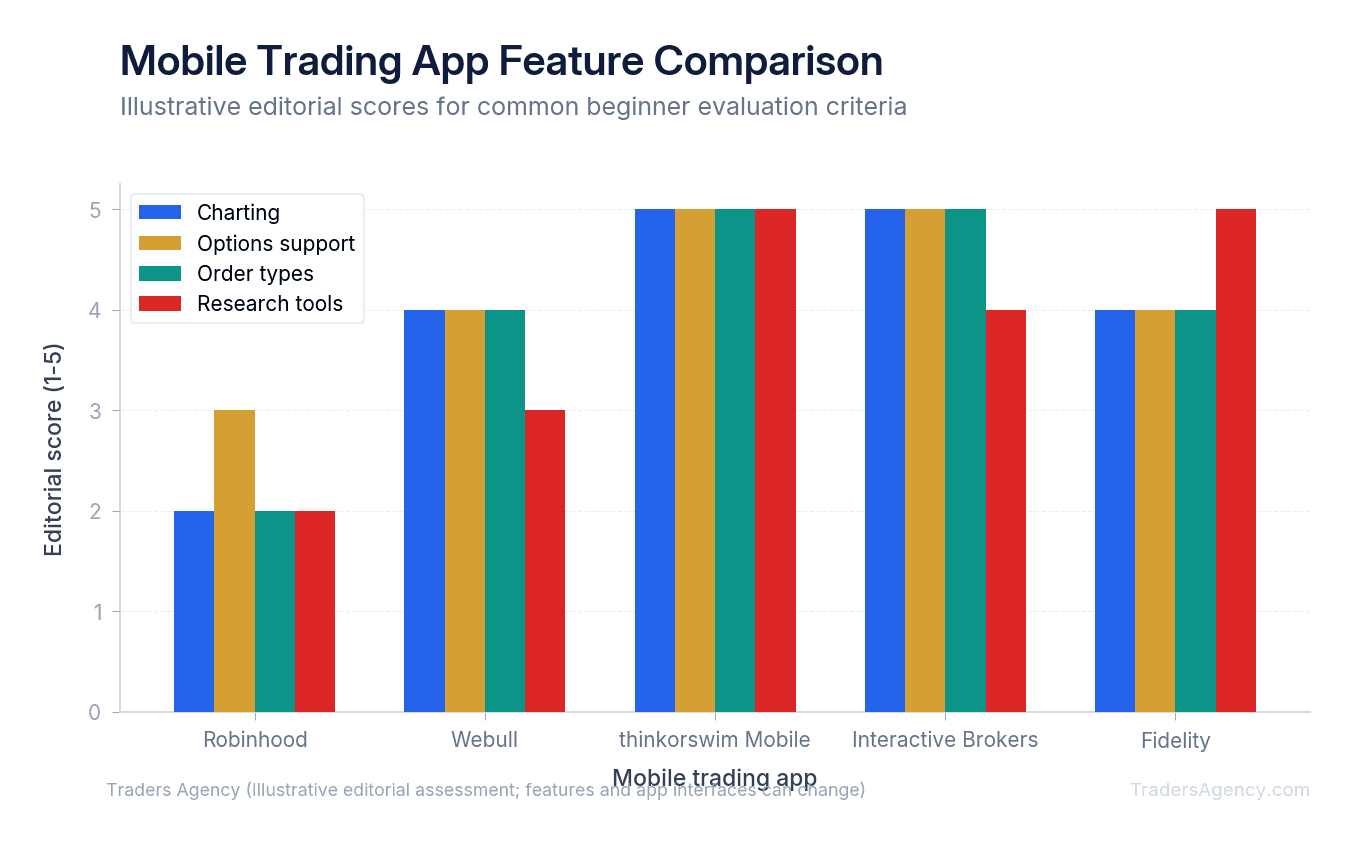
Charting, options support, and research tools
thinkorswim Mobile and Interactive Brokers both offer advanced charting with customizable technical indicators, multiple timeframes, and detailed options chains showing Greeks (metrics like delta and theta that measure an option's sensitivity to price and time). Robinhood's charting is far more basic by comparison, and its options screen shows less analytical detail.
Order types vary too. All five apps support basic market orders (buy or sell immediately at the best available price) and limit orders (buy or sell only at a specific price or better). Interactive Brokers and thinkorswim Mobile go further with conditional orders and advanced order routing, features newer traders may not need right away but active traders lean on constantly.
Fees and commissions
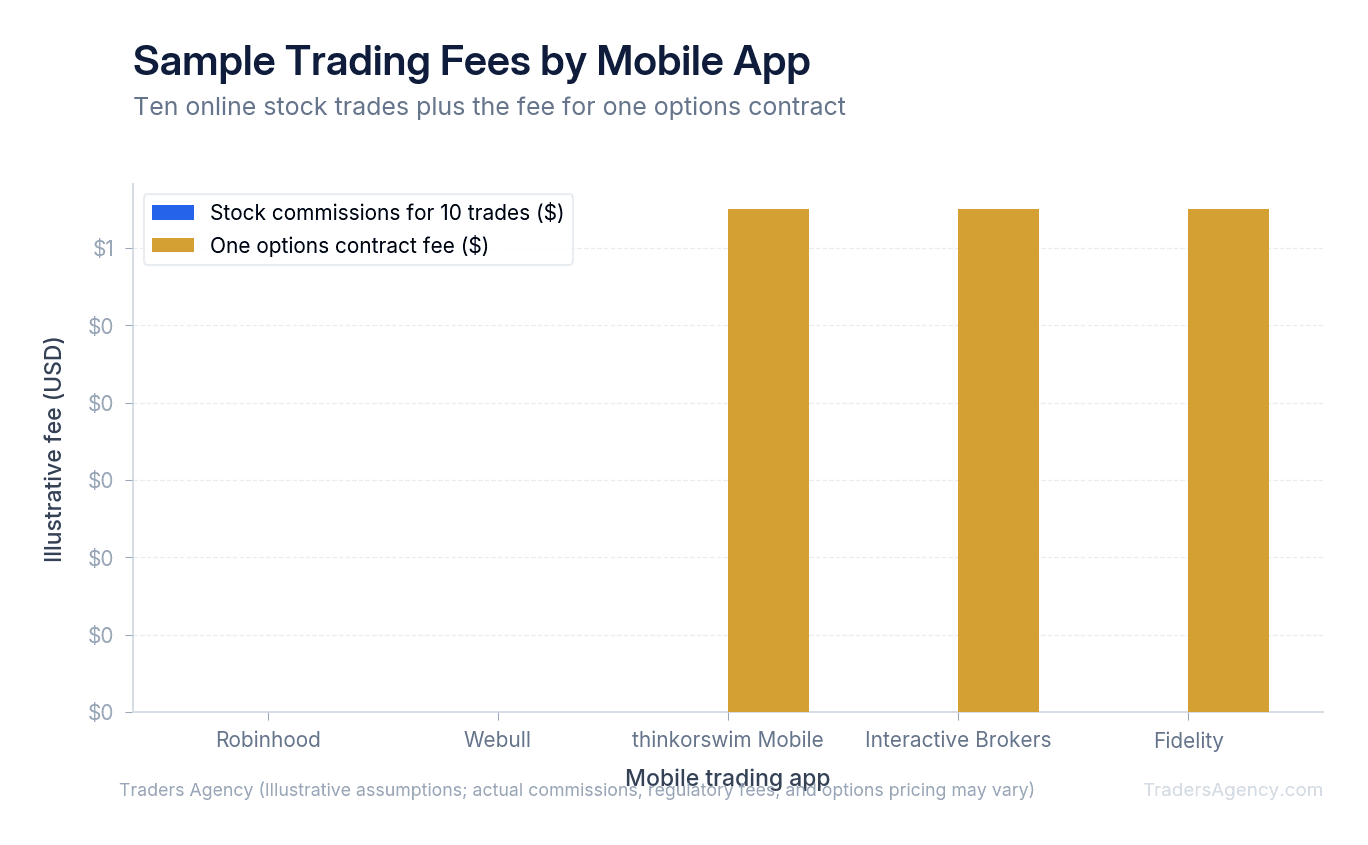
Commission-free stock trading became the industry standard years ago, and all five platforms here offer a $0 commission option on standard stock trades, though Interactive Brokers' professional pricing tier charges a small per-share commission instead. Where costs actually show up is in options contracts, where a small per-contract fee (often around $0.50 to $0.65) is common on some platforms while others charge nothing per contract.
It's worth understanding how brokerages that advertise "free" trades still make money. Some rely on a practice called payment for order flow, where the app is paid by market makers for routing your order to them, which can affect your execution price slightly. You can read more about how order execution works in the SEC's investor education materials, and we'd encourage you to read your app's own order execution disclosures before assuming "free" means zero cost.
A warning on margin
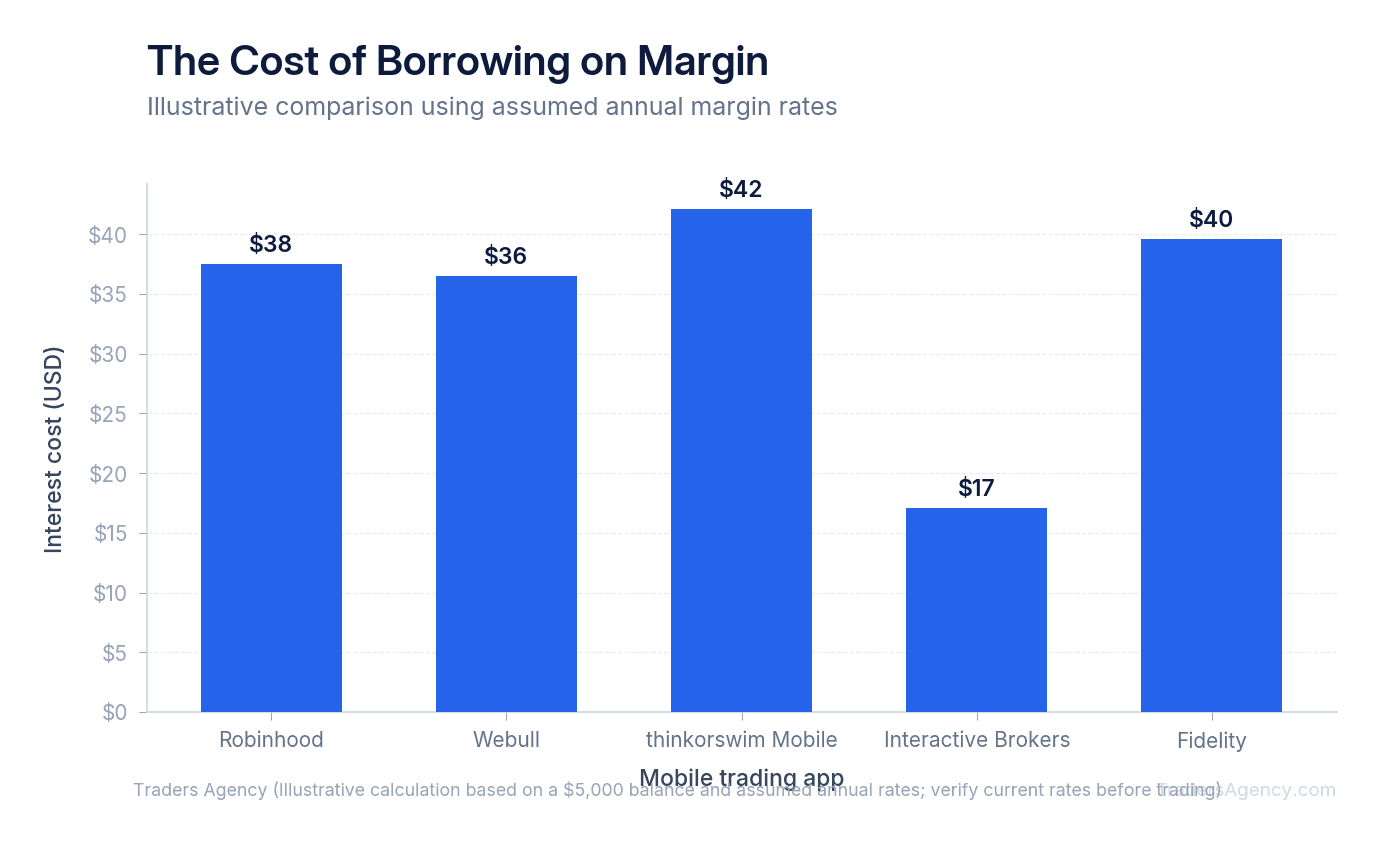
Several of these apps let you borrow money against your account to trade with, known as margin. Margin amplifies both gains and losses, and it accrues interest daily on the amount borrowed.
Watch Out: A $5,000 margin balance left open for a month can quietly rack up meaningful interest costs depending on your app's rate, on top of any losses in the position itself. Beginners should understand the borrowing rate before enabling margin at all.
How Secure Are Mobile Trading Apps?
All five apps are registered brokerages, which means your cash and securities are typically protected by SIPC coverage (Securities Investor Protection Corporation) up to standard limits if the brokerage itself fails. That protection does not cover losses from bad trades, only the brokerage going out of business.
To keep your account secure, here's what we recommend:
- Turn on two-factor authentication in the app's security settings
- Never share your login credentials, even with "trading signal" services
- Review linked bank accounts and withdrawal permissions regularly
- Check login alerts and unfamiliar device notifications the moment they arrive
What Are Common Pitfalls of Mobile Trading Apps?
A common question beginners ask is: can I make $1,000 a day day trading? Technically it's possible with a large enough account and the right conditions, but it's far from typical, and most new traders lose money before they find any consistency. Treat any promise of guaranteed daily profits as a red flag, regardless of which app you're using.
Another frequent question: is $100 enough to start day trading? You can open most of these apps and place a small trade with $100, but day trading specifically falls under the Pattern Day Trader (PDT) rule, enforced by FINRA, which requires a minimum $25,000 account balance if you make four or more day trades within five business days in a margin account. With $100, you can still learn the platform and practice with small positions, but you won't be able to day trade actively without hitting that restriction.
Here are the pitfalls we see most often among new app users:
- Confusing a market order with a limit order and getting filled at a worse price than expected
- Enabling margin without understanding the daily interest cost
- Chasing options trades without understanding expiration and time decay
- Ignoring app notifications about account restrictions or margin calls
- Trading off app "trending" lists rather than personal research
Tips for Getting the Most Out of Your Trading App
A few habits separate traders who use these apps well from those who get burned by them.
- Use the app's paper trading or simulated mode if it offers one, especially on thinkorswim Mobile, before risking real capital
- Set price alerts instead of checking your portfolio every twenty minutes
- Read the fee schedule in full at least once, even if the app markets itself as free
- Start with small position sizes, risking no more than 1% to 2% of your account on any single trade while you're still learning the interface
- Cross-check research from the app against outside sources like company filings on SEC EDGAR before making a decision
Remember This: Whether you land on Robinhood for simplicity, Fidelity for research, or thinkorswim Mobile for advanced charting, the strongest habit you can build early is treating your mobile trading app as a tool you fully understand, not just a button you tap.
Want expert trading insights delivered daily?
Join thousands of traders who rely on Traders Agency for market analysis and trade ideas.
Join Traders AgencyKey Takeaways
- The article compares five widely used mobile trading apps, Robinhood, Webull, thinkorswim Mobile, Interactive Brokers, and Fidelity, across charting, options support, order types, research tools, and fees.
- Beginners are advised to start with small position sizes, risking no more than 1% to 2% of their account on any single trade while still learning an app's interface.
- Traders should use paper trading or simulated modes, especially the one on thinkorswim Mobile, before risking real capital.
- Even apps marketed as free should have their fee schedule read in full at least once, since differences in execution and hidden costs can still apply.
- Research pulled from a trading app should be cross-checked against outside sources, such as company filings on SEC EDGAR, before making a decision.
DISCLAIMER: Traders Agency does not offer financial advice. The information provided is for educational purposes only and should not be considered financial advice. Traders Agency is not responsible for any financial losses or consequences resulting from the use of the information provided. Trading carries inherent risks and may not be suitable for all individuals. You are advised to conduct your own research and seek personalized advice before making any investment decisions, recognizing the potential risks and rewards involved.
See more from Traders Agency on Google
Make us a preferred source and our market analysis will appear more prominently in your Google Search, Top Stories, and AI results.
Add to Preferred Sources