
You've probably clicked "buy" on a stock, watched it fill a few cents higher than you expected, and wondered what went wrong. Or maybe you set a price target that never triggered, and the stock ran away without you. Both situations usually trace back to the same root cause: not understanding how order types actually work.
In this guide, our education team walks you through the market vs limit order decision, plus how stop orders and stop-limit orders fit into the picture. By the end, you'll know which order type to reach for, how to place each one on your platform, and the mistakes that trip up new traders most often.
We'll cover real numbers, step-by-step platform instructions, and the timing settings (Day versus GTC) that determine how long your order stays alive. This is foundational knowledge, and getting it right protects your capital from day one.
What Is a Market Order and How Do I Use It?
Bottom Line: Choosing between market and limit orders comes down to prioritizing speed or price control, and knowing which to use (plus stops and stop-limits) prevents the bad fills and missed entries that trip up new traders. Mastering these mechanics, including order timing settings, is foundational risk management that protects capital from the start.
A market order is an instruction to buy or sell a stock immediately at the best available price. You're not naming a price. You're telling your broker "fill this now," and the trade executes within seconds.
Here's why that matters: market orders prioritize speed over price control. If a stock's current ask price is $100.00, your market buy order will likely fill near there, but in fast-moving markets it might fill at $100.15 or $100.30 instead. That gap between the expected and actual fill price is called slippage.
Key Concept: A market order guarantees execution but not price. A limit order guarantees price but not execution. Every order decision you make flows from that single tradeoff.
Step-by-Step: Placing a Market Order
- Step 1: Find the Ticker - Open your broker's trading screen and search for the symbol you want to trade.
- Step 2: Pick Your Direction - Select "Buy" or "Sell."
- Step 3: Set the Order Type - Choose Order Type: Market.
- Step 4: Enter Quantity - Type in the number of shares.
- Step 5: Review the Summary - No price field will appear, since market orders don't use one.
- Step 6: Confirm and Submit - Double-check the share count, then send the order.
Market orders work best for highly liquid stocks and ETFs, where the gap between the bid and the ask (the spread) stays narrow. For a large-cap S&P 500 component, slippage is usually pennies. For a thinly traded small-cap, it can be meaningful.
What Is a Limit Order and How Does It Work?
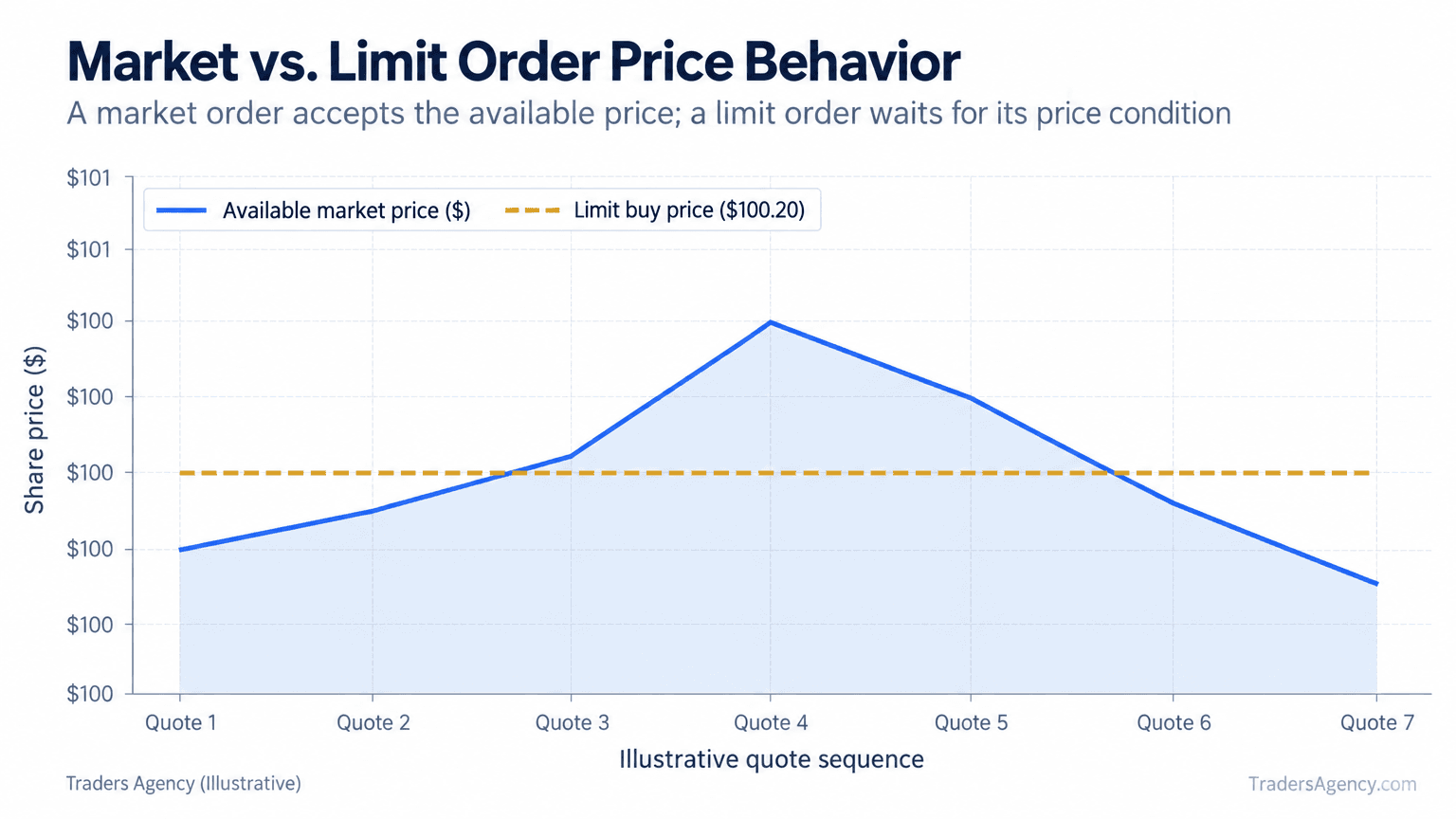
A limit order is an instruction to buy or sell at a specific price or better. You set the maximum you're willing to pay (for a buy) or the minimum you'll accept (for a sell), and the order only fills if the market reaches your number.
This is the heart of the market vs limit order comparison. One prioritizes certainty of getting filled. The other prioritizes certainty of what you pay.
A Limit Order Example
Say a stock is trading at $101.50, and you've decided $100.20 is a fair entry. You place a limit buy order at $100.20.
| Parameter | Value |
|---|---|
| Current Price | $101.50 |
| Limit Buy Price | $100.20 |
| If price drops to $100.20 or lower | Order fills at $100.20 or better |
| If price never drops that low | Order sits unfilled, no position taken |
| Primary Risk | Missing the move entirely |
That's the tradeoff in plain terms. You control your entry price, but you accept the chance of missing the trade if the stock never comes to you.
Step-by-Step: Placing a Limit Order
- Step 1: Open the Trade Ticket - Pull up the trading screen and select "Buy" or "Sell."
- Step 2: Set the Order Type - Choose Order Type: Limit.
- Step 3: Enter Your Price - Type your target price into the limit price field.
- Step 4: Enter Quantity - Add the share count.
- Step 5: Choose a Duration - Day or GTC (we cover this in detail below).
- Step 6: Confirm and Submit - Review the full ticket, then send it.
One terminology note that trips up plenty of newer traders: a limit sell follows the same logic in reverse. You're setting the minimum price you'll accept, so the order only executes at that price or higher.
Market vs Limit Order: Which Is Better for You?
Neither order type wins universally. The right choice depends on how much you value speed versus price control on that specific trade.
We teach traders to answer three questions before deciding: How liquid is this stock? How fast is the price moving right now? And how much does a few cents of slippage actually matter to this strategy?
| Situation | Our Recommendation | Why |
|---|---|---|
| Large-cap stock, regular hours | Market order | Tight spread, minimal slippage |
| Thinly traded small-cap | Limit order | Wide spread can produce a bad fill |
| Entering at a technical level | Limit order | Price precision is the whole point |
| First or last 15 minutes of session | Limit order | Spreads widen at the open and close |
| Need out of a position immediately | Market order | Execution certainty outranks price |
For ETF trades specifically, many traders on our team default to limit orders during the opening and closing minutes of the day, when ETF spreads tend to widen. And while order screens look different from broker to broker, the underlying logic doesn't change. Only the screen layout does.
Want expert trading insights delivered daily?
Join thousands of traders who rely on Traders Agency for market analysis and trade ideas.
Join Traders AgencyWhat Is a Stop Order, and How Is It Used?
A stop order sits inactive until the stock hits a specific trigger price, at which point it converts into a market order. Traders use stop orders to cap losses or lock in gains on an existing position.
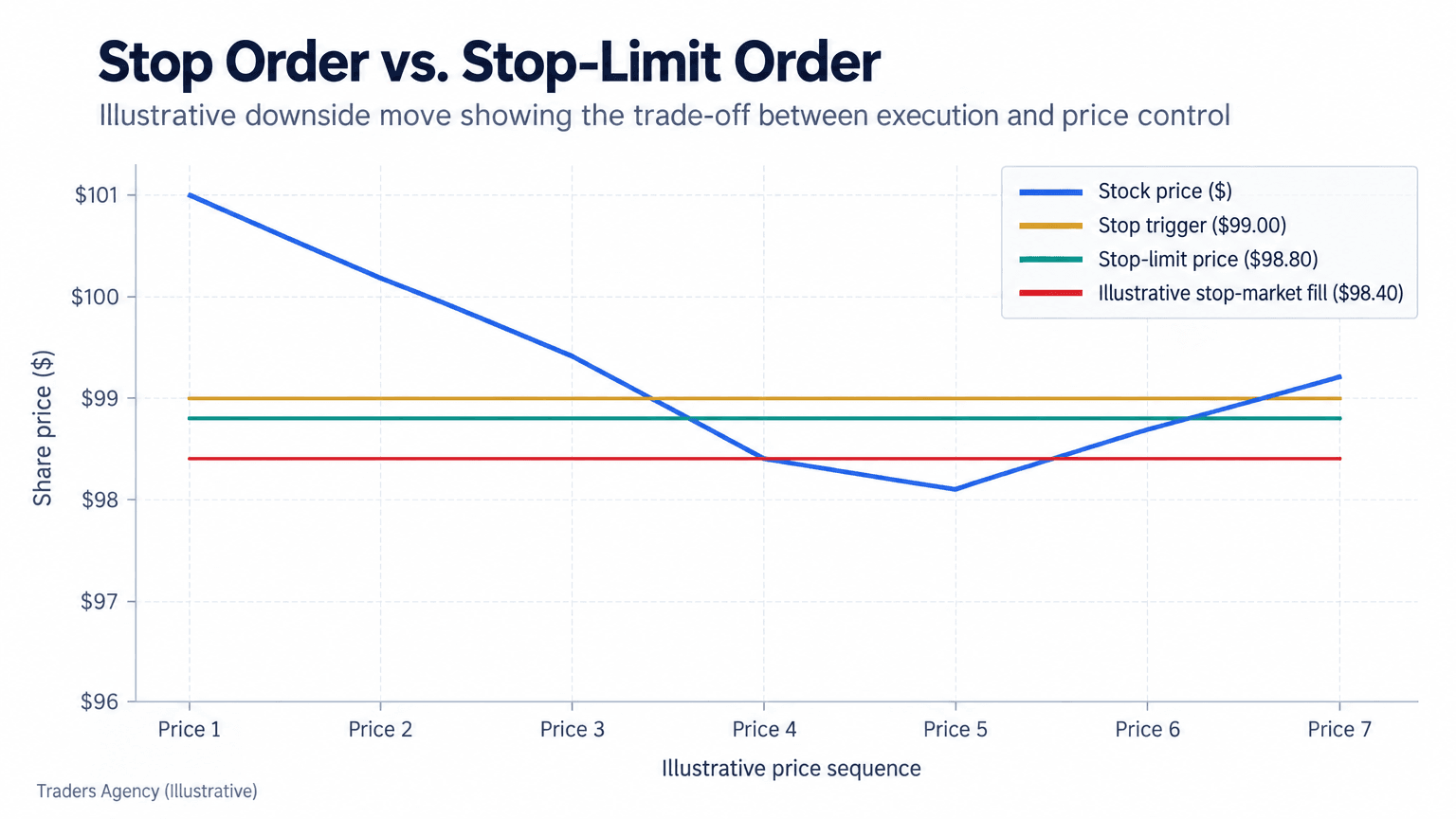
Here's a concrete setup. You own a stock trading at $105 and place a stop order at $99. If the price falls to $99, the stop triggers and becomes a market order, selling at whatever price is next available: maybe $99, maybe $98.70, maybe lower if the stock is dropping fast.
That's the distinction between a stop order and a limit order in one sentence: a stop guarantees you get out once triggered, but not at what price.
Step-by-Step: Placing a Stop Order
- Step 1: Select the Position - Choose the holding you want to protect.
- Step 2: Set the Order Type - Choose Order Type: Stop (sometimes labeled "Stop Market").
- Step 3: Enter the Trigger Price - This is the price that activates the order.
- Step 4: Enter Quantity - Full position or partial, your call.
- Step 5: Confirm and Submit - Verify the trigger before sending.
How Do Stop-Limit Orders Combine Both Approaches?
A stop-limit order pairs a trigger price with a limit price, giving you both an activation condition and a price floor or ceiling. Once the stop price is hit, the order becomes a limit order rather than a market order.
Using the earlier example: you set a stop price of $99 and a limit price of $98.80. If the stock falls to $99, the order activates as a limit sell at $98.80 or better. But if the stock crashes straight through $98.80 without pausing, your order may never fill, and you're still holding the position.
| Order Type | Trigger | Fill Price | Execution Guaranteed? |
|---|---|---|---|
| Stop (Market) | $99 | Next available, could be $98.40 | Yes, once triggered |
| Stop-Limit | $99 | $98.80 or better only | No |
Watch Out: A stop-limit order protects your price, but it does not guarantee you exit the position. During a fast decline or a gap down at the open, a stop-limit can fail to execute entirely and leave you holding a falling stock. Gap risk is built into how these orders behave in volatile sessions, and every trader should understand that before relying on one. You can review exchange order-handling mechanics directly at Cboe.
What's the Difference Between GTC and Day Orders?
Every order you place also needs a duration setting, and the two most common are Day and GTC (Good-Till-Canceled).
A day order expires automatically at the end of the trading session if it hasn't filled. A GTC order stays active across multiple sessions, typically until it fills or you cancel it. Most brokers cap GTC duration, and the limit varies by firm, commonly somewhere between 60 and 180 days.
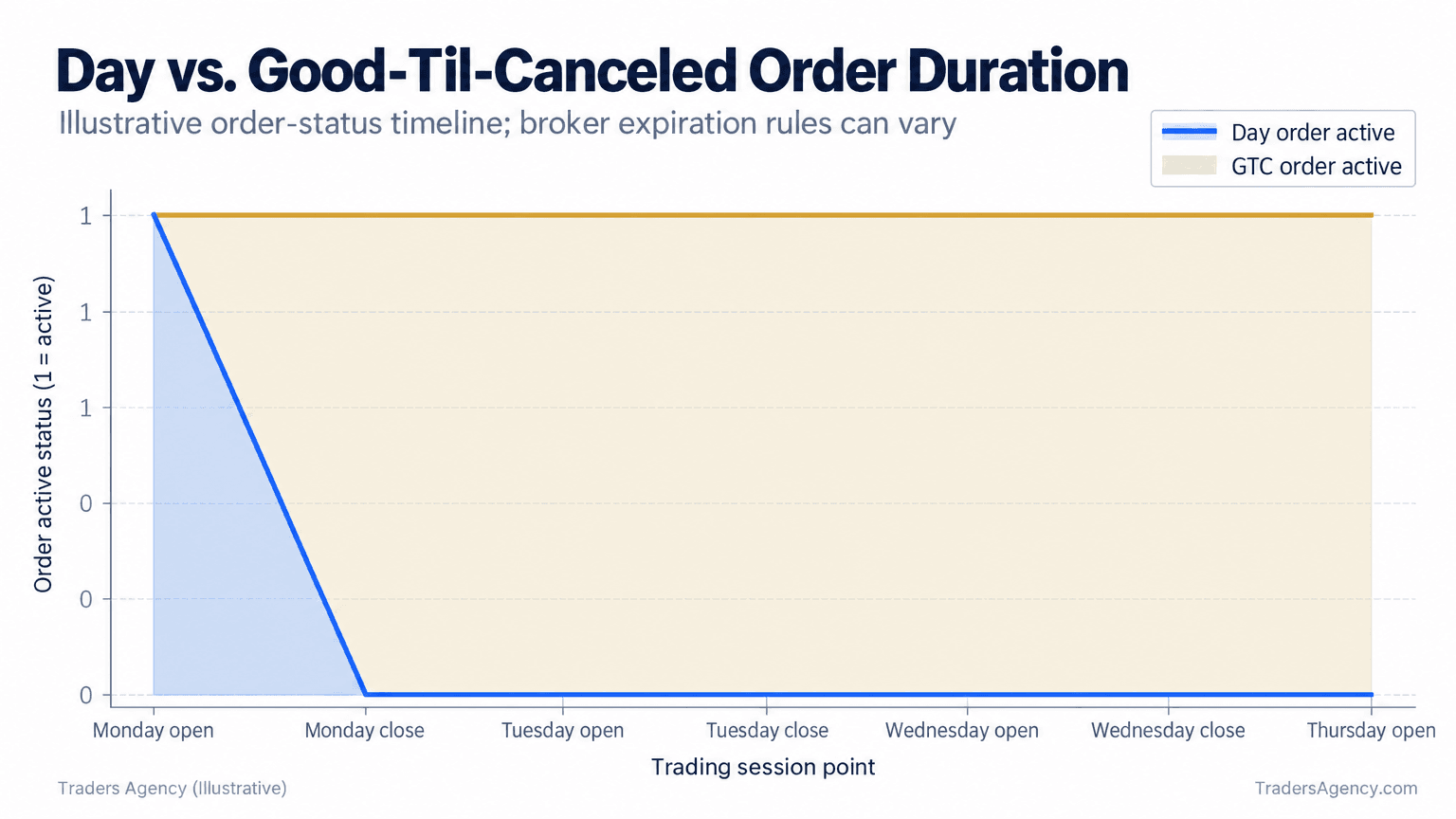
Here's the practical rule we use. If you're placing a limit order at a price well away from the current market, choose GTC so you're not re-entering it every morning. If the trade is short-term and price-sensitive, choose Day so an old order doesn't suddenly fill days later at a price that no longer fits your plan.
What Are Common Mistakes When Choosing Between Market and Limit Orders?
Newer traders tend to repeat the same handful of mistakes. These are the ones we see most:
- Using market orders on thinly traded stocks. Low volume means wide spreads, and a market order can fill far from the price on your screen.
- Placing limit orders and expecting an instant fill. A limit order only fills when the market actually reaches your price, no matter how close it looks.
- Forgetting extended-hours rules. Outside regular market hours, most platforms accept limit orders only, and thinner liquidity means sharper price swings.
- Leaving a GTC order active and forgetting it. Stale orders resurface and fill at prices that no longer make sense.
- Confusing a stop with a stop-limit. One guarantees execution, the other guarantees price. Mixing them up during a volatile move gets expensive.
One question worth answering directly: what happens if your limit buy price is higher than the current market price? It typically fills immediately at the better (lower) market price, since a limit buy sets your maximum, not your exact price. In that scenario, it behaves much like a market order.
And on the frequently searched 7% rule: that's a risk management guideline, not an order type. It suggests selling a losing position once it falls roughly 7% to 8% below your purchase price, and traders often automate that exit with a stop order.
How Do You Apply Order Types to Risk Management?
Order types are tools, not strategies on their own. How you use them should fit the broader risk framework you've already built.
- Position sizing: Decide how many shares you're buying before you choose an order type, not after.
- Stop placement: Set stop or stop-limit levels based on a percentage or technical level you chose in advance, not on emotion after a drop.
- Allocation: Don't let any single position, whatever order type you used, take up an outsized share of your account.
- Platform familiarity: Practice every order type in a demo account first, so the mechanics are automatic when the market moves fast.
Remember This: For highly liquid, large ETFs during regular trading hours, market orders are generally fine. For less liquid ETFs, or during the opening and closing minutes of the session, a limit order gives you price protection that a market order simply cannot.
Master these four order types and you've removed a whole category of avoidable losses from your trading. Bad fills, missed entries, and stops that didn't behave the way you expected are all solvable problems once you understand the mechanics underneath them.
Want expert trading insights delivered daily?
Join thousands of traders who rely on Traders Agency for market analysis and trade ideas.
Join Traders AgencyDISCLAIMER: Traders Agency does not offer financial advice. The information provided is for educational purposes only and should not be considered financial advice. Traders Agency is not responsible for any financial losses or consequences resulting from the use of the information provided. Trading carries inherent risks and may not be suitable for all individuals. You are advised to conduct your own research and seek personalized advice before making any investment decisions, recognizing the potential risks and rewards involved.
See more from Traders Agency on Google
Make us a preferred source and our market analysis will appear more prominently in your Google Search, Top Stories, and AI results.
Add to Preferred Sources