
You have probably experienced this before: the market opens, prices flash green and red across your screen, and you freeze because you have no idea what to trade. Our team sees beginners struggle with this information overload every single day. Without a plan, traders click randomly and chase stocks that are already moving too fast. A prepared stock watchlist solves this problem completely, acting as your daily roadmap. We are going to walk you through the exact steps to build, organize, and maintain a highly effective watchlist so you can filter out the noise and focus only on the setups that match your trading plan.
What Is a Watchlist Used for in Trading?
Bottom Line: A well-built watchlist removes the paralysis that comes from information overload by narrowing your focus to a small set of setups that already meet your criteria before the market opens. The discipline is in the pruning: a list that grows too large or goes unreviewed becomes just as useless as having no list at all. Patience is the actual edge here, waiting for the market to come to your levels rather than chasing what is already moving.
A watchlist is a customized list of securities you monitor for potential trading opportunities. Instead of scanning the entire market during active trading hours, you use a watchlist to focus your attention on high-probability setups that meet your specific criteria and wait for predetermined entry signals.
Think of a watchlist like a scouting report in sports. A coach does not evaluate every player in the league on game day. They focus entirely on the opposing team they are playing that week. In trading, your watchlist is your scouting report for the week.
Key Concept: A watchlist is not a shopping list of stocks you want to buy. It is a focused monitoring tool that helps you wait patiently for specific price levels and patterns to trigger before you take action.
Our team recommends building lists based on specific criteria like earnings dates, technical patterns, or sector strength. The SEC's investor education resources remind traders to research companies thoroughly before buying. A watchlist gives you the time to do that research before the pressure of the live market hits.
When you prepare in advance, you remove emotion from the equation. You are no longer reacting to sudden market spikes. Instead, you are calmly waiting for a stock to reach a price level you already calculated.
How Many Stocks Should Be on a Watchlist?
A beginner should keep their watchlist limited to 5 to 15 stocks at any given time. Tracking too many stocks leads to analysis paralysis and missed entries. Advanced traders might monitor 50 or more tickers, but starting small ensures you can effectively manage your attention and execute your trading plan.
When you are learning how to set up a watchlist, less is always more. If you have 100 stocks on your screen, you are not actually watching any of them. You are just staring at a wall of numbers.
We prefer to teach our members to master a small basket of stocks first. You want to learn how these specific ticker symbols move, how they react to news, and what their average daily volume looks like.
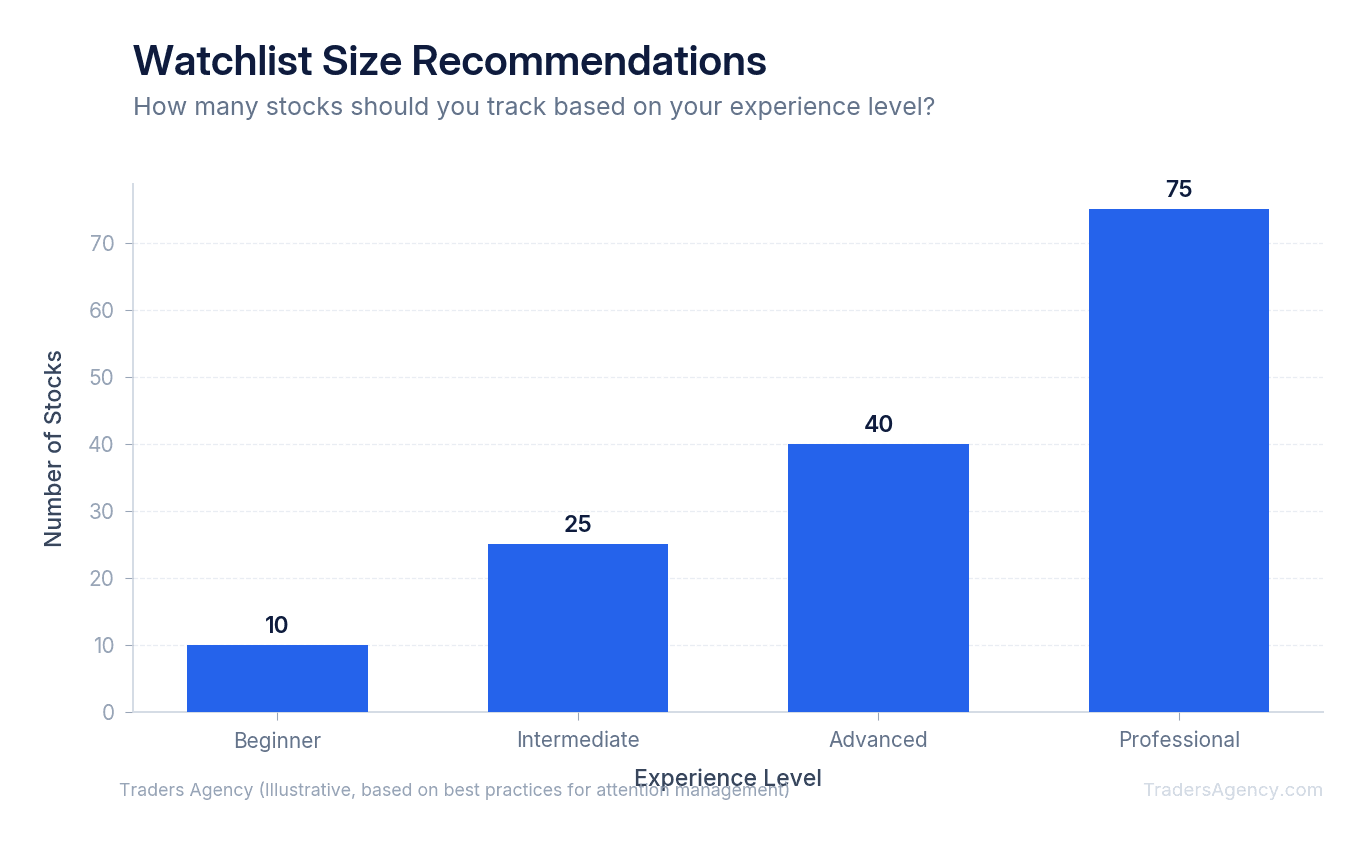
Every stock has its own unique personality. Some move slowly and steadily, while others experience wild price swings. By keeping your list small, you can memorize these behaviors. This familiarity gives you a massive advantage when it is time to execute a trade.
How to Organize Your Watchlist by Sector, Strategy, or Timeframe
Once you select your stocks, you need to organize them logically. A messy list is just as bad as having no list at all. We teach our members to categorize their tickers so they know exactly why a stock is on their screen. You can organize your lists in several ways depending on your trading style.
1. Organizing by Sector
Grouping stocks by their industry helps you track broader market trends. If you see AAPL, MSFT, and NVDA all moving up together, you know the technology sector is showing strength.
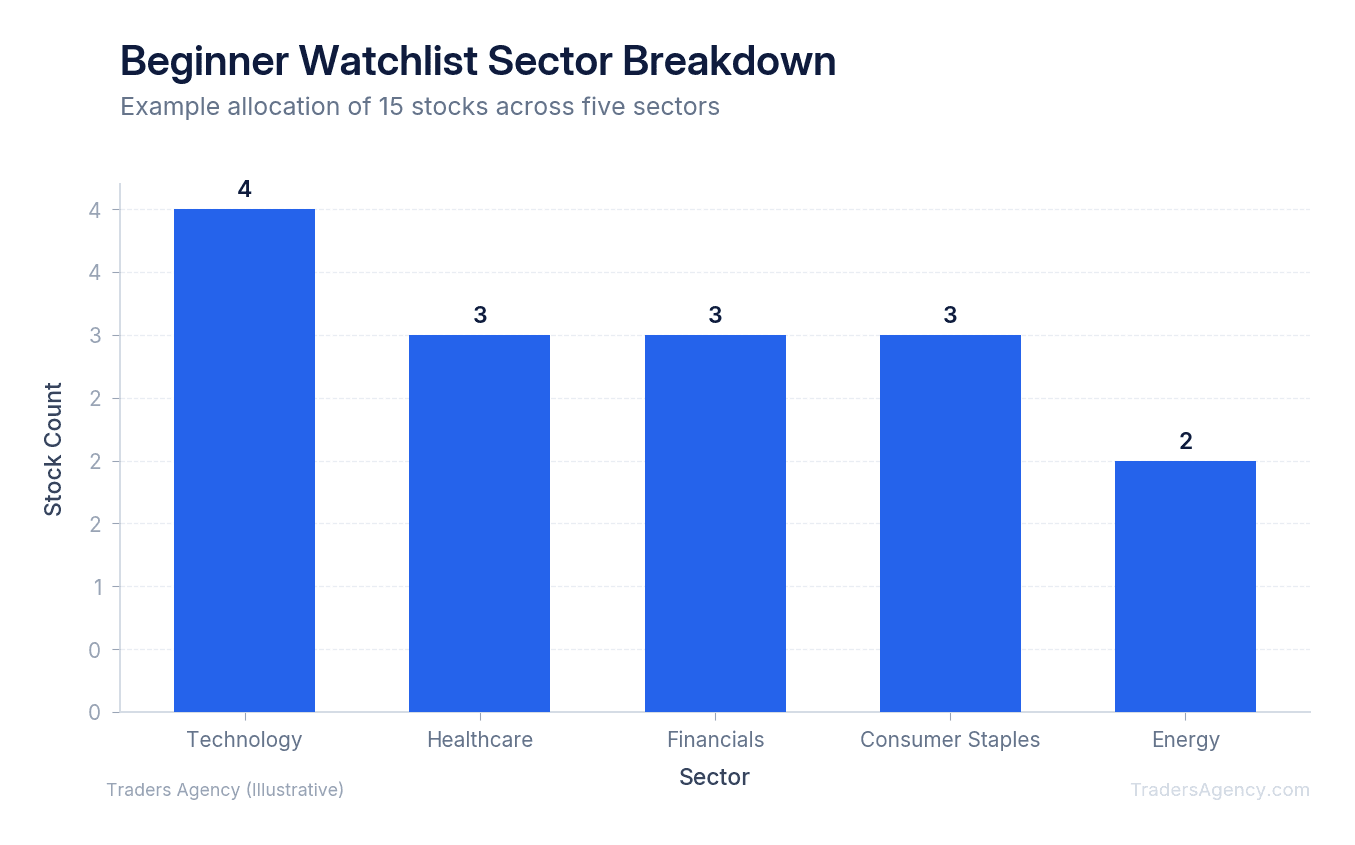
You might also create lists for the financial sector or the energy sector. When oil prices rise, you can quickly click on your energy list to find the best trading candidates.
2. Organizing by Strategy
You might have one list for breakout trades and another for dividend investing. Keeping these separate prevents you from applying the wrong strategy to the wrong stock. A slow-moving utility stock belongs on an income list, not a day trading list.
3. Organizing by Timeframe
Day traders need different lists than swing traders. You can create a "Daily Focus" list for immediate setups happening today. Then, you can maintain a "Long-Term" list for stocks you want to buy if they drop to a specific price next month.
Which Columns Should You Display on Your Watchlist?
You should display the ticker symbol, last price, net change, percentage change, and daily volume on your watchlist. These five columns provide a quick snapshot of a stock's current performance and liquidity without cluttering your screen with unnecessary data.
Most trading platforms allow you to customize your data columns. We see many beginners add 20 different columns, which only causes confusion. Keep your layout clean and focused on price action.
| Column | What It Shows | Why It Matters |
|---|---|---|
| Ticker Symbol | The abbreviation for the company | Quick identification at a glance |
| Last Price | The most recent traded price | Shows where the stock is right now |
| Net Change | Dollar amount moved since yesterday's close | Tells you the direction and magnitude of the move |
| % Change | The move expressed as a percentage | Great for comparing stocks at different price levels |
| Volume | Number of shares traded today | Confirms liquidity and interest in the stock |
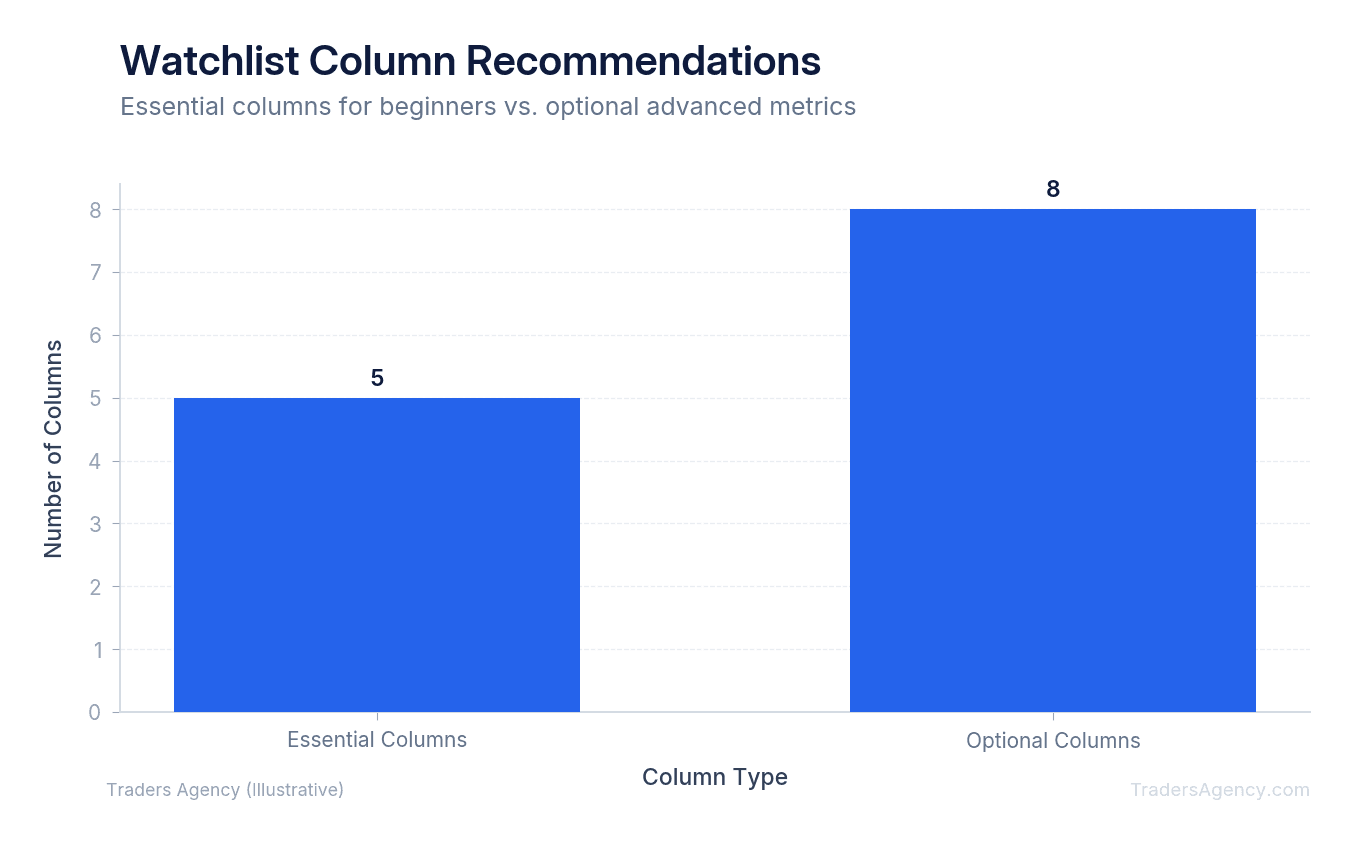
Once you master the basics, you can add a column for the bid and ask spread. This shows the difference between the highest price a buyer will pay and the lowest price a seller will accept. You can also add the 52-week high to see how close a stock is to its yearly peak.
Want expert trading insights delivered daily?
Join thousands of traders who rely on Traders Agency for market analysis and trade ideas.
Join Traders AgencyHow to Set Up a Watchlist: A Step-by-Step Example
To set up a watchlist, open your trading platform, locate the watchlist widget, and click "create new list." Name your list based on its purpose, type in the ticker symbols you want to track, and adjust the column settings to display price, percentage change, and trading volume.
Here is a concrete example using a simple swing trading strategy:
- Define Your Setup: You want to trade large-cap technology stocks approaching a support level, which is a price point where a stock has historically stopped falling and bounced back up. Name your new list "Tech Support Bounces."
- Build the List: Open your brokerage platform and create a blank list. Type in the symbols AAPL, GOOGL, META, and AMZN. Set your columns to show last price, percentage change, and volume.
- Set Price Alerts: Configure alerts on your platform for specific price levels. For example, if AAPL is trading at $175, set a price alert for $170, which is your planned entry point near support.
- Wait and Execute: Let the market come to you. When a stock hits your alert level, review the chart one more time to confirm the setup, then execute your trade according to plan.
| Scenario | What Happens | Your Action |
|---|---|---|
| Best Case | AAPL hits your $170 alert, you enter, price bounces to your $180 target | Take profit at target |
| Worst Case | AAPL drops through $170 on heavy volume, breaking support | Delete from list, no trade taken, no money lost |
| Most Likely | Only 1-2 of your watched stocks trigger an entry signal each week | Exercise patience and wait for your setup |
This patience is exactly why the strategy works. You are not forcing trades. You are letting the market deliver opportunities directly to you.
How Do You Use Scanning Tools to Populate Your Watchlist?
Finding the right stocks manually takes hours. That is why our team relies on a stock scanner to do the heavy lifting. A stock scanner is a software tool that filters the entire market based on your specific rules.
For example, you can program a scanner to find stocks that meet these criteria:
- Priced between $20 and $50
- Trading more than 1 million shares per day
- Currently trading above their 50-day moving average
The scanner instantly produces a list of 10 stocks that meet these exact conditions. You then review these 10 stocks individually, look at their charts, identify their support and resistance levels, and pick the best three to add to your daily watchlist.
Key Concept: A stock scanner turns a massive market of over 8,000 stocks into a highly targeted action plan. You set the rules once, and the scanner does the filtering for you every day. You never have to guess what to trade again.
We recommend using the scanning tools built into your brokerage platform first. Most major platforms, including FINRA's free investor tools, offer basic screening capabilities that work well for beginners.
How Should You Review and Update Your Watchlist Each Week?
A watchlist is a living document. If you do not update it, it becomes useless very quickly. We teach our members to perform a weekly review every Sunday afternoon. During this review, you will perform three specific tasks to prepare for the week ahead.
- Clean Out Dead Wood: Remove any stock that has already made its move or broken its technical pattern. If a stock on your list drops 20% on bad earnings, take it off. It no longer fits your original trading thesis. Keeping dead stocks on your list only creates distractions.
- Update Price Alerts: Adjust your entry and exit alerts based on the previous week's price action. If a stock slowly drifted higher, you might need to raise your support alert. Keeping your price alerts accurate means you will not miss a trade while looking away from the screen.
- Add Fresh Setups: Run your weekend scanners to find new opportunities. Add the top candidates to your list to replace the ones you removed. This keeps your watchlist fresh and relevant.
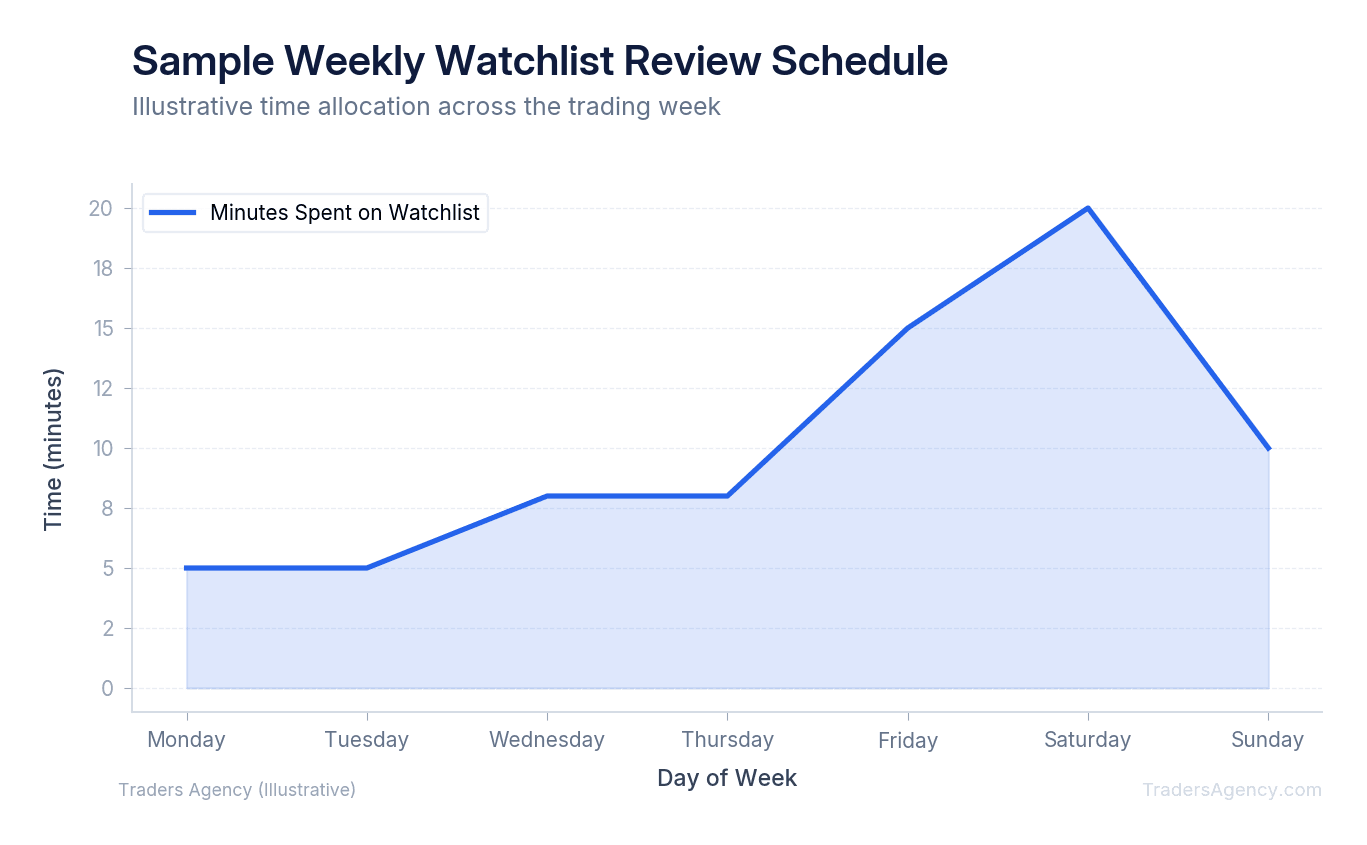
This weekly maintenance ensures you always start Monday morning with a fresh, highly actionable plan. It takes about 30 minutes, but it saves you hours of frustration during the trading week.
What Are the Most Common Watchlist Mistakes Traders Make?
Knowing when to use your watchlist is just as important as knowing how to build it. A watchlist works best in trending markets where technical patterns follow through cleanly. However, there are specific times when you should step back. Do not force trades just because a stock is on your screen.
Here are the most common mistakes we see beginners make:
- Chasing the news: Adding a stock to your list just because it is trending on social media usually leads to buying at the absolute top. Stick to your technical criteria.
- Ignoring risk management: Just because a stock is on your list does not mean it is a guaranteed winner. Always use stop losses and keep your position sizing consistent. Never risk more than 1% to 2% of your total account on a single trade.
- Trading through earnings: Holding a short-term trade during an earnings announcement is gambling. We recommend removing stocks from your active list if they report earnings that week.
- Hoarding tickers: If your list grows to 40 or 50 stocks, you need to prune it. You cannot effectively monitor that many charts at once.
Watch Out: Your watchlist is a tool to enforce discipline, not a guarantee of profits. It forces you to wait for the market to come to your levels. If a stock does not trigger your specific entry criteria, you simply do not trade it. Patience is the edge.
The Traders Agency education team publishes new strategy guides and market analysis every week. Building a strong watchlist habit is one of the best things you can do for your trading consistency, and we are here to help you every step of the way.
Want expert trading insights delivered daily?
Join thousands of traders who rely on Traders Agency for market analysis and trade ideas.
Join Traders AgencyKey Takeaways
- A watchlist is a monitoring tool, not a shopping list. You only act when a stock hits your predetermined price level or pattern trigger, not simply because it appears on the list.
- Keeping your watchlist under 40 tickers is a hard rule. Once it grows to 40 or 50 stocks, you lose the ability to monitor charts effectively and the list stops serving its purpose.
- Organizing by sector, strategy, or timeframe lets you match setups to your specific trading plan instead of reacting to whatever is moving on a given day.
- Scanning tools are used to populate your watchlist before the market opens, not during active trading hours when decision-making is most vulnerable to noise.
- A weekly review process is essential for maintenance. Stocks that no longer meet your criteria, including those with earnings that week, should be removed to keep the list actionable.
DISCLAIMER: Traders Agency does not offer financial advice. The information provided is for educational purposes only and should not be considered financial advice. Traders Agency is not responsible for any financial losses or consequences resulting from the use of the information provided. Trading carries inherent risks and may not be suitable for all individuals. You are advised to conduct your own research and seek personalized advice before making any investment decisions, recognizing the potential risks and rewards involved.
See more from Traders Agency on Google
Make us a preferred source and our market analysis will appear more prominently in your Google Search, Top Stories, and AI results.
Add to Preferred Sources