
Every time you click "buy" or "sell" on your trading platform, you're making a decision about order type, whether you realize it or not. A market order fills immediately at whatever price the market offers. A limit order only fills at the price you set or better. Add stop orders to the mix, and that single button on your screen suddenly represents several very different tools, each with its own risks and best-use situations.
You've probably seen this happen: you place a trade expecting one price, and the fill comes back noticeably higher or lower than what you saw on your screen a few seconds earlier. That gap between expectation and reality is almost always the result of using the wrong order type for the situation.
We'll walk you through exactly how market orders, limit orders, and stop orders work, how to place each one on a typical brokerage platform, and when to reach for one instead of another. By the end, you'll know how to pick the right order type for your next trade and sidestep the mistakes that trip up most new traders.
What Is a Market Order and How Does It Work?
Bottom Line: Market, limit, and stop orders each trade off speed for price control differently, so there is no single best order type. Choose based on liquidity, volatility, position size, and how urgently you need the fill, and test unfamiliar order types on a paper account before using them with real money.
A market order is an instruction to buy or sell a security immediately at the best price currently available. It prioritizes speed of execution over price control, which means you're guaranteed a fill but never guaranteed a specific price.
Here's what that looks like in practice. Say a stock is quoted at $100.05 bid / $100.10 ask. If you place a market order to buy 100 shares, your platform routes the order straight to the exchange, and it typically fills within a second or two at or near that $100.10 ask price.
Key Concept: A market order guarantees that your trade happens. It does not guarantee the price at which it happens.
Step-by-Step: Placing a Market Order
- Step 1: Open the Trade Ticket -- Pull up your platform's order entry screen and enter the ticker symbol.
- Step 2: Choose Your Direction -- Select "Buy" or "Sell."
- Step 3: Set the Order Type -- Choose "Market" from the order type dropdown.
- Step 4: Enter Quantity -- Type in your share count.
- Step 5: Review and Confirm -- Check the estimated price shown on screen, then submit.
The catch is a concept called slippage. If the stock is moving fast, or if it's thinly traded, the price you actually pay can differ meaningfully from the last quoted price. On a highly liquid stock, slippage might be a penny or two. On a small-cap stock with wide spreads, it could be 50 cents or more per share.
What Is a Limit Order and How Does It Work?
A limit order is an instruction to buy or sell only at a specific price or better. Unlike a market order, it hands you full control over price, but it comes with no promise that the trade will fill at all.
When you place a buy limit order at $100.00 on a stock trading at $100.10, your order sits and waits. It fills only if the price drops to $100.00 or lower. A sell limit order works in reverse: it waits until the price rises to your target or higher.
Step-by-Step: Placing a Limit Order
- Step 1: Open the Trade Ticket -- Enter the symbol and select "Buy" or "Sell."
- Step 2: Set the Order Type -- Choose "Limit" from the dropdown.
- Step 3: Enter Your Price -- Type the exact price you're willing to accept.
- Step 4: Choose a Duration -- Set your time-in-force (we cover this in detail below).
- Step 5: Confirm and Monitor -- Submit the order, then watch your open orders tab to see whether it fills.
This is the heart of the limit order vs. market order tradeoff: one guarantees execution, the other guarantees price. You can't have both at the same time.
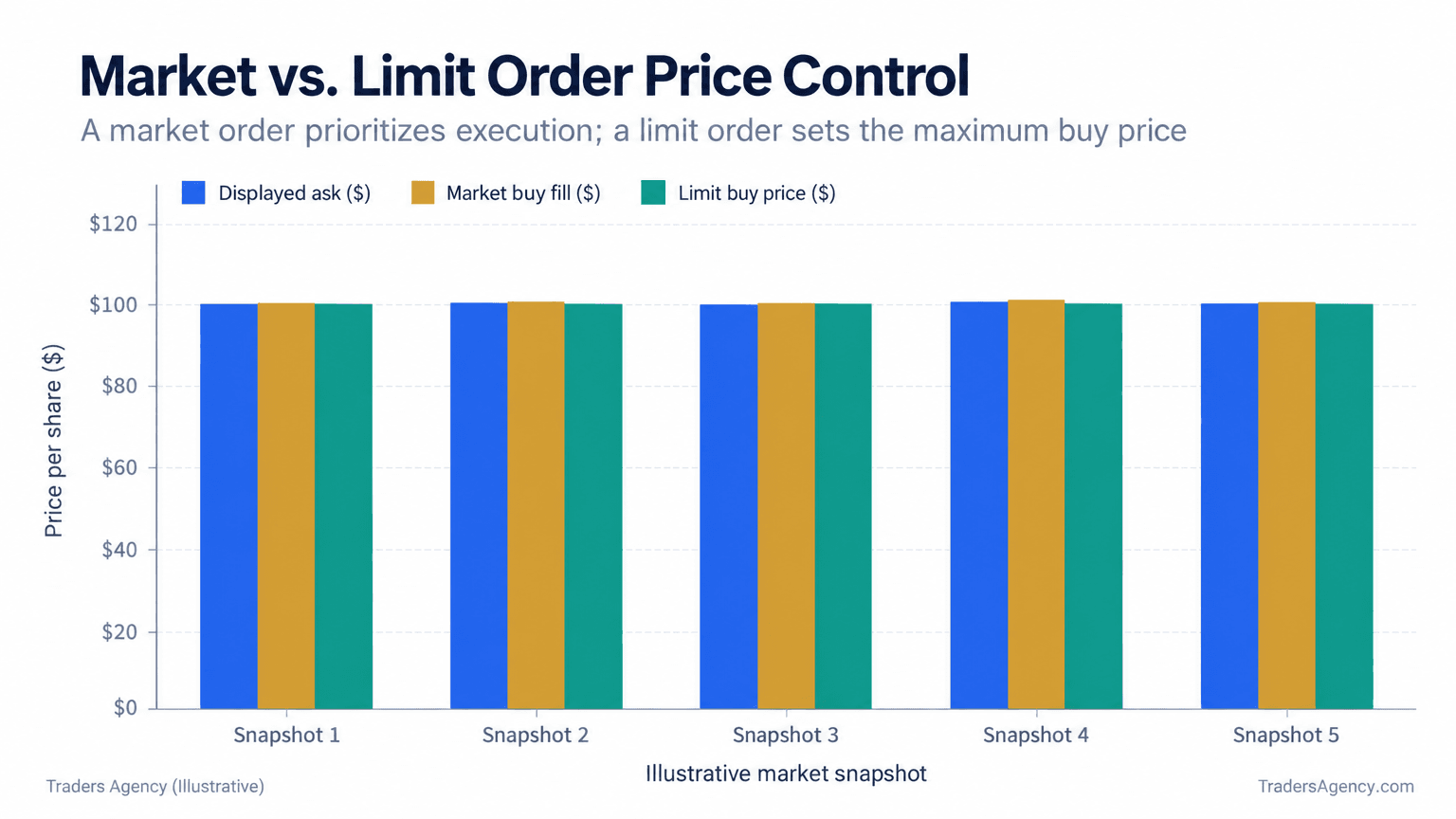
Notice in the chart above how the market order fill drifts slightly away from the displayed ask price, while the limit order price stays locked at exactly $100, whether or not it ever fills.
Which Is Better, Limit or Market Order?
The market vs limit order question has no universal answer. Market orders win when speed matters more than price. Limit orders win when price control matters more than certainty of execution.
For highly liquid stocks and major ETFs with tight spreads, a market order rarely costs you much. For smaller, less liquid securities, or during volatile news events, a limit order protects you from paying far more (or receiving far less) than you intended.
That also answers a question we hear often from newer members: should I buy an ETF with a market or limit order? For large, heavily traded ETFs with a spread of a penny or two, a market order is usually fine on small share counts. For less common ETFs, or larger orders, a limit order keeps you out of an unexpected price jump.
A Quick Decision Framework
| Situation | Our Recommended Order Type | Why |
|---|---|---|
| Liquid large-cap or major ETF, small size | Market | Tight spread means slippage is minimal |
| You need the fill right now | Market | Execution is guaranteed |
| You have a specific price target | Limit | You control the price you pay or receive |
| Thin, volatile, or wide-spread security | Limit | Protects against large slippage |
| Large order relative to average volume | Limit | Prevents your own order from moving price against you |
Want expert trading insights delivered daily?
Join thousands of traders who rely on Traders Agency for market analysis and trade ideas.
Join Traders AgencyWhat Is a Stop Order, and How Is It Used?
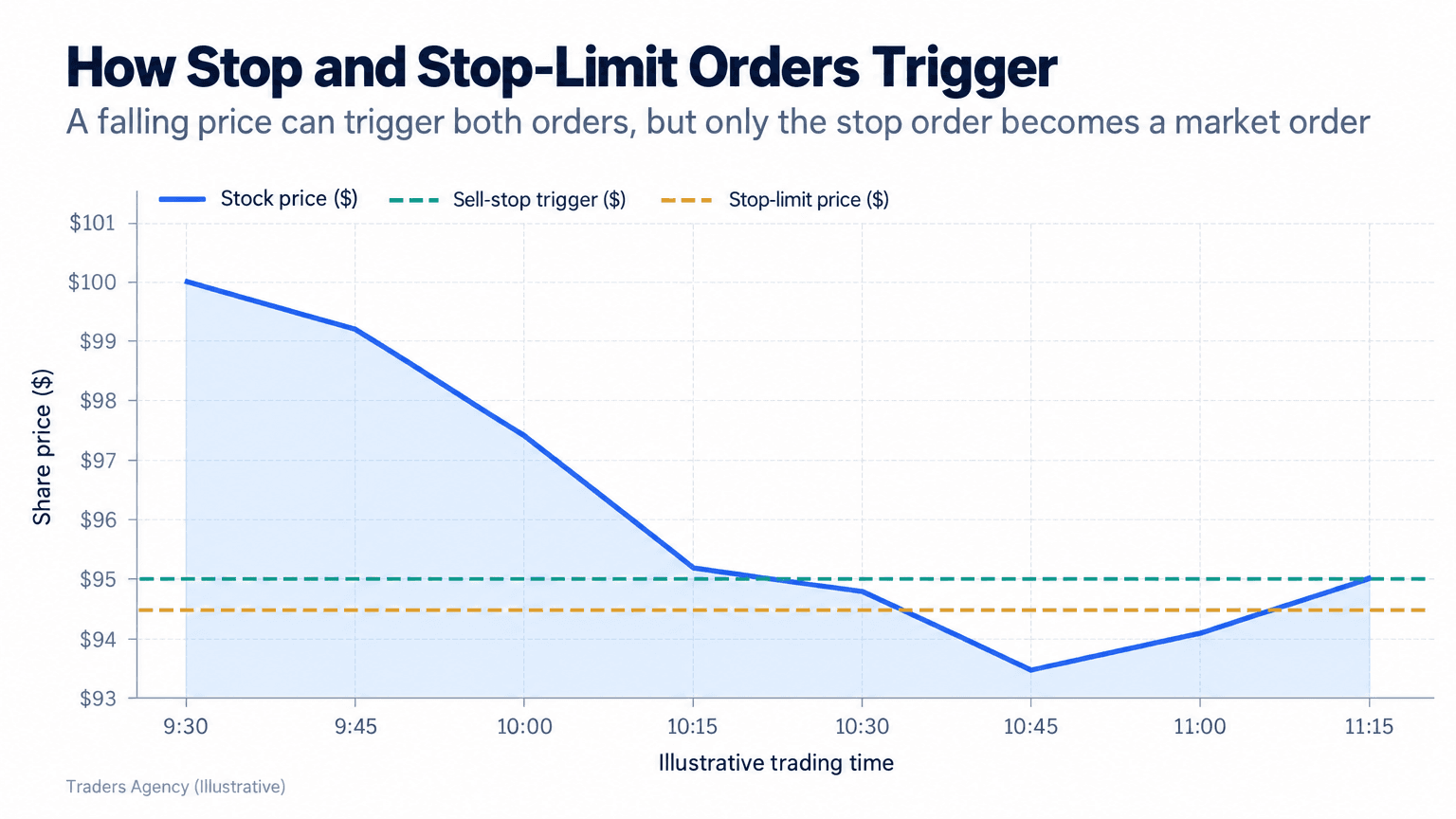
A stop order is an instruction that turns into a market order once a stock reaches a specific trigger price, commonly called the stop price. Most traders use it to limit losses on a position they already own.
For example, if you own shares purchased at $100 and want to cap your downside, you might place a sell stop order at $95. If the stock falls to $95, your stop automatically becomes a market order and sells your shares at the next available price.
A stop-limit order blends both ideas. It triggers at your stop price just like a regular stop, but instead of becoming a market order, it becomes a limit order at a price you specify. Using the same example, a stop-limit order might trigger at $95 but only fill at $94.50 or better, which means it can fail to execute entirely if the price keeps falling.
| Parameter | Sell Stop Order | Sell Stop-Limit Order |
|---|---|---|
| Entry Price | $100 | $100 |
| Trigger (Stop) Price | $95 | $95 |
| Limit Price | None | $94.50 |
| Becomes | Market order | Limit order |
| Execution | Effectively guaranteed once triggered, but not at the stop price | Not guaranteed |
| Price Control | None | Yes, $94.50 or better |
This stop order vs. stop-limit order distinction matters enormously in fast-moving markets, because the stop-limit version protects your price but not your exit.
How Do Price Gaps Affect Stop Orders?
Stop orders don't protect you perfectly, and the clearest example is a stock that gaps down overnight past your stop price. If a stock closes at $96 and opens the next morning at $88 on bad news, your $95 stop still triggers, but it fills near $88, not $95.
That gap risk is part of why many traders follow a guideline known as the 7% rule: setting a stop-loss roughly 7% to 8% below your purchase price to cap downside on any single position. It offers no protection against overnight gaps, but it gives newer traders a disciplined, repeatable starting point for managing position-level losses.
Watch Out: Treat stop orders as damage control tools, not precision instruments. They behave well in normal conditions but can fill far from your stop price during earnings releases, economic data surprises, or after-hours news.
Day Orders vs. GTC Orders: What's the Difference?
A day order expires automatically at the end of the trading session if it hasn't filled. A Good-Til-Canceled (GTC) order stays active across multiple sessions, often up to 60 or 90 days depending on your broker, until it fills or you cancel it.
Step-by-Step: Setting Order Duration
- Step 1: Find the Setting -- On the trade ticket, look for a duration or time-in-force dropdown.
- Step 2: Choose "Day" -- Select "Day" if you only want the order live for the current session.
- Step 3: Choose "GTC" -- Select "GTC" if you want the order to persist across multiple days.
- Step 4: Verify the Limit -- Confirm your broker's specific GTC time cap, since it varies from platform to platform.
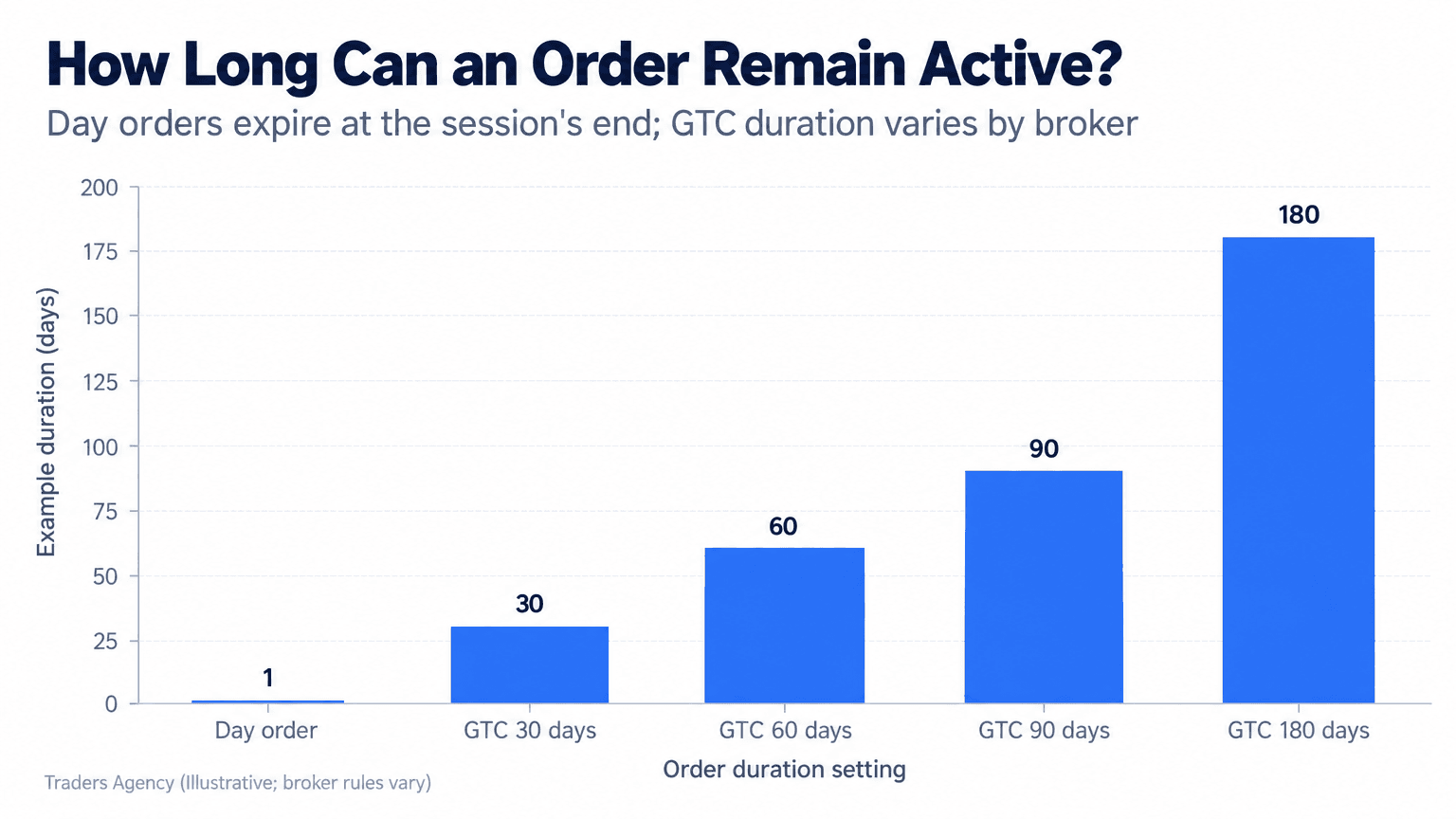
Duration settings matter most for stop and stop-limit orders. A GTC stop left in place for months can protect a long-term position, but you need to revisit it periodically as the stock moves, or it will sit at a level that no longer makes any sense.
What Are the Common Pitfalls When Choosing an Order Type?
Most beginner mistakes with order types come down to mismatched expectations rather than a flawed strategy. These are the ones we see most often:
- Assuming a limit order will always fill. One of the real disadvantages of limit orders is that a stock can move away from your price and never come back, leaving your order unfilled indefinitely.
- Using market orders on illiquid stocks. Wide bid-ask spreads on thinly traded names can produce painful slippage on what looks like a simple market order.
- Forgetting extended hours rules. Many brokers accept only limit orders during pre-market and after-hours sessions, because low volume makes market orders considerably riskier.
- Leaving GTC orders unattended. A stop or limit order you set months ago may no longer reflect current price levels or your updated plan.
- Confusing stop orders with stop-limit orders. A stop order guarantees execution but not price. A stop-limit order guarantees price but not execution.
How Do You Build Order Types Into Your Trading Plan?
Our approach is simple: match the order type to the specific goal of each trade instead of defaulting to the same choice every time.
For routine entries on liquid large-cap stocks or major ETFs, a market order is usually efficient and low-risk. For more precise entries, smaller or more volatile names, or larger position sizes, a limit order gives you the control you need to avoid overpaying or underselling.
Stop orders and stop-limit orders do their best work inside a broader risk management plan. We teach members to size each position so that a stop-loss triggering at the predetermined level, whether that's a fixed dollar amount or something close to the 7% rule, risks only a small percentage of total account value on any single trade.
Understanding order execution mechanics is one of the foundational skills to build before committing real capital, and the educational materials at the U.S. Securities and Exchange Commission and the Cboe are solid supplements to what we cover here. Our advice: practice with a paper trading account on your broker's platform before running live GTC stop orders, because the mechanics often behave differently in real time than they look on paper.
Remember This: There is no single "best" order type. The right choice depends entirely on liquidity, volatility, position size, and how badly you need the fill.
Want expert trading insights delivered daily?
Join thousands of traders who rely on Traders Agency for market analysis and trade ideas.
Join Traders AgencyDISCLAIMER: Traders Agency does not offer financial advice. The information provided is for educational purposes only and should not be considered financial advice. Traders Agency is not responsible for any financial losses or consequences resulting from the use of the information provided. Trading carries inherent risks and may not be suitable for all individuals. You are advised to conduct your own research and seek personalized advice before making any investment decisions, recognizing the potential risks and rewards involved.
See more from Traders Agency on Google
Make us a preferred source and our market analysis will appear more prominently in your Google Search, Top Stories, and AI results.
Add to Preferred Sources